Streamlining Digital Typography: A Practical Guide to Using 26 Alphabet Brushes Stamps in Procreate
In the rapidly evolving landscape of digital illustration, efficiency often dictates the quality and volume of work an artist can produce. For designers, hobbyists, and professional illustrators working within the iPad ecosystem, the demand for tools that bridge the gap between custom hand-lettering and rapid layout design is higher than ever. This is where specialized resources like 26 Alphabet Brushes Stamps come into play. Rather than relying solely on manual drawing or static text boxes, these brush sets offer a hybrid approach, allowing users to stamp pre-designed characters directly onto their canvas while retaining the flexibility of digital painting.
Understanding whether this type of tool fits your workflow requires a look beyond the surface-level convenience. It involves evaluating how stamp brushes compare to traditional typography methods, assessing their limitations, and determining if they align with your specific creative goals. This article explores the practical applications, installation processes, and strategic advantages of using alphabet stamp brushes in Procreate, helping you make an informed decision about integrating them into your digital toolkit.
Defining the Tool: What Are Alphabet Stamp Brushes?
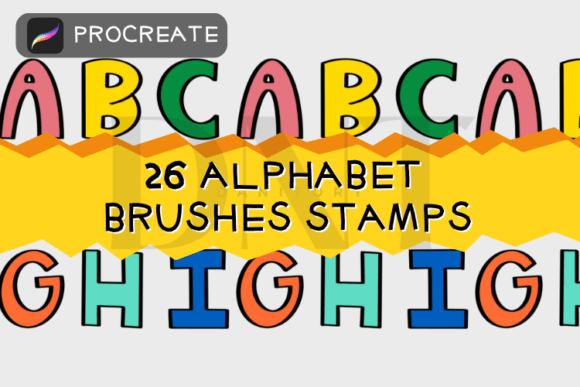
At their core, 26 Alphabet Brushes Stamps are a collection of digital assets designed specifically for the Procreate application. Unlike standard fonts that generate vector-based text layers, these brushes function as image stamps. Each letter of the alphabet is embedded within a individual brush tip. When you tap the screen, the brush "stamps" that specific character onto your layer. The set typically includes all 26 letters, packaged in a single zipped file for easy distribution and installation.
The distinct advantage of this format lies in its texture and integration. Because these are brushes rather than font files, the letters can possess hand-drawn qualities, organic textures, or artistic flourishes that standard typefaces often lack. Furthermore, because they exist within the painting environment, they respond to layer settings such as opacity, blending modes, and color adjustments in real-time. This allows for a level of artistic cohesion that can be difficult to achieve when copying and pasting external text elements into a digital painting.
Comparative Analysis: Stamp Brushes vs. Traditional Typography
When deciding whether to use 26 Alphabet Brushes Stamps, it is essential to compare them against the two primary alternatives: native text tools and manual hand-lettering.
Efficiency vs. Customization
Manual hand-lettering offers the highest degree of customization but demands significant time and skill. Every curve and line must be drawn by hand, which can be prohibitive for tight deadlines. Native text tools in Procreate are fast and editable but often feel sterile or disconnected from the painted elements of an artwork. Alphabet stamp brushes occupy a middle ground. They provide the speed of a text tool—since you are tapping rather than drawing each stroke—while maintaining the organic, textured feel of hand-created art. However, they do sacrifice the ability to easily edit typos; changing a letter requires erasing and restamping, unlike the fluid editability of a text box.
Texture and Integration
One area where stamp brushes excel is in visual integration. When you use a standard font, you are often left with crisp, digital edges that may clash with a watercolor or charcoal-style background. With 26 Alphabet Brushes Stamps, the letters can be designed with rough edges, grain, or pressure-sensitive variations (if programmed into the brush dynamics). This allows the typography to feel like a natural part of the illustration rather than an overlay. For artists creating greeting cards, social media graphics, or textured posters, this seamless blend is a significant benefit.
Practical Application and Workflow Integration
To truly evaluate the utility of these brushes, one must consider how they fit into a typical workflow. The process begins with acquisition and setup. The product usually arrives as a single zipped file containing the brush set. For iPad users, the installation process is streamlined: you unzip the file on your device, and upon opening the brush file, Procreate automatically imports it into your brush library. This ease of installation lowers the barrier to entry, making it accessible even for those who are not technically inclined.
Once installed, the usage is intuitive. You select the desired letter from the brush list and tap the canvas. However, the true power lies in the post-stamp manipulation. Users can resize the stamp brushes freely, adjusting the scale to create hierarchy in their design. You can change the color to match your palette, adjust opacity for subtle watermark effects, or alter blending modes to make the text interact with underlying layers. This flexibility means that a single set of 26 Alphabet Brushes Stamps can serve multiple purposes across different projects, from bold headlines to delicate decorative elements.
Ideal Use Cases
- Social Media Content: Creating quick, visually engaging quotes or announcements where unique typography adds brand personality.
- Digital Planning: Adding decorative headers or labels to digital planners without the rigidity of standard fonts.
- Greeting Cards and Invitations: Designing personalized cards where a hand-crafted look is preferred over formal typesetting.
- Mixed Media Art: Incorporating text into collage-style digital artworks where texture consistency is crucial.
Limitations and Decision Factors
While 26 Alphabet Brushes Stamps offer considerable benefits, they are not a universal solution. Understanding their limitations is key to avoiding frustration.
Lack of Editability: As mentioned, once a letter is stamped, it becomes pixel data. You cannot simply backspace and correct a spelling error. You must erase the incorrect letter and stamp the new one. For long passages of text, this can become tedious and inefficient compared to using a text box.
Consistency Challenges: Maintaining consistent spacing and alignment requires a steady hand or the use of Procreate’s drawing guides. Unlike text tools that automatically kern and align letters, stamp brushes rely on the user’s eye for placement. This can be a drawback for designs requiring precise typographic structure.
Platform Restriction: These brushes are designed specifically for Procreate on the iPad. They are not compatible with desktop software like Photoshop or Illustrator, nor do they work on Android-based drawing apps. If your workflow involves cross-platform compatibility, this limitation may necessitate looking for vector-based alternatives or font files instead.
Making the Right Choice for Your Projects
Deciding whether to invest time in learning and using 26 Alphabet Brushes Stamps depends on your specific needs. If your primary goal is speed and you are working on short phrases, titles, or decorative elements where texture and artistic flair are paramount, these brushes are an excellent choice. They reduce the friction between idea and execution, allowing you to decorate and design with greater ease.
However, if you are working on lengthy documents, require precise typographic control, or need to frequently edit text content, traditional text tools or professional font libraries may be more appropriate. The best approach is often a hybrid one: using stamp brushes for impactful visual elements and standard text tools for informational content.
Ultimately, the value of 26 Alphabet Brushes Stamps lies in their ability to inject personality and efficiency into digital art. By understanding their strengths and tradeoffs, you can determine if they are the right resource to enhance your creative process. Whether you are a seasoned illustrator looking to speed up your workflow or a beginner eager to add professional-looking typography to your designs, these tools offer a compelling balance of convenience and artistic expression. Thank you for considering how these resources can support your creative journey.