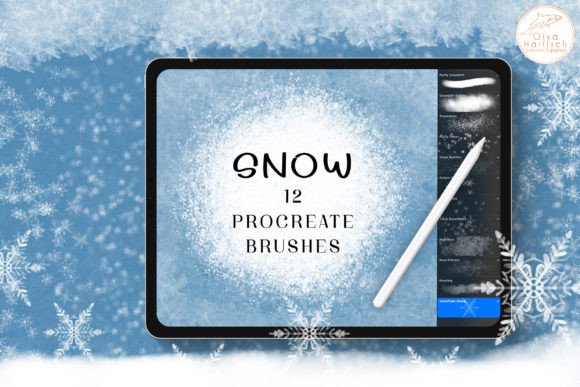
Winter Snow and Ice Procreate Brushes: Elevate Your Digital Art with Realistic Frost Effects
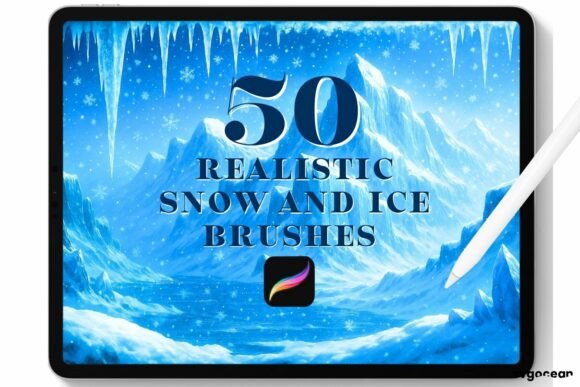
Capturing the ethereal beauty of winter in digital art is a challenge that many illustrators face. The translucency of ice, the soft accumulation of snowdrifts, and the chaotic dance of falling flakes require more than just standard round brushes. This is where specialized tools like the Winter Snow and Ice Procreate Brushes become indispensable. Designed specifically for the Procreate app on iPad, this collection offers a streamlined way to inject atmospheric depth and seasonal charm into your work without spending hours manually painting every individual flake.
Whether you are a concept artist designing a frozen landscape, a graphic designer creating holiday marketing materials, or a hobbyist looking to add a touch of whimsy to your portraits, understanding how to leverage these specific brush types can significantly enhance your workflow. The set includes twelve distinct brushes, categorized to handle everything from heavy blizzards to delicate frost patterns, providing a comprehensive toolkit for any winter-themed project.
Transforming Landscapes with Depth and Texture
One of the most common applications for this brush set is in landscape illustration. Drawing realistic snow is tricky because it isn't just white; it reflects the sky, shadows are cool blues and purples, and the texture varies from powdery to packed ice. The Snowdrift brushes included in this pack address this complexity directly.
The Fluffy Snowdrift brush is ideal for establishing the base shapes of snowbanks. Instead of laboriously building up opacity with a standard airbrush, this tool allows you to lay down soft, organic masses that mimic the way snow settles against trees, rocks, or buildings. It creates a heavy, soft look that feels substantial. Conversely, the Snowdrift Blender is perfect for those moments when you need to soften edges or create the illusion of wind-swept, airy snow. By using these two in tandem, artists can create a sense of volume and weight in their landscapes that flat coloring often misses.
For background artists working in animation or game design, speed is crucial. These brushes allow for rapid iteration. You can block out a snowy environment in minutes, focusing on composition and lighting rather than getting bogged down in texture details. This efficiency is particularly valuable for professionals working under tight deadlines who still need to deliver high-quality, atmospheric environments.
Adding Atmospheric Motion to Static Images
Static images can feel lifeless without a sense of movement. Snowfall is one of the most effective ways to add dynamic energy to a scene. The Snowfall brushes in this set offer three distinct intensities, allowing you to control the mood of your piece precisely.
If you are illustrating a dramatic scene, such as a character struggling against the elements, the Snowstorm brush provides a heavy, blizzard-like effect. It fills the screen with dense precipitation, obscuring background details and creating a sense of isolation and cold. On the other hand, for a peaceful, quiet evening scene, the Snow Sprinkle brush adds a light, gentle dusting that suggests calmness. The Fluffy Flakes brush sits in the middle, offering wet, heavier flakes that respond to pressure sensitivity. This variability allows for a more realistic result, as you can vary the size and opacity of the flakes within a single stroke, mimicking the natural randomness of falling snow.
Photographers and digital photo manipulators also benefit greatly from these tools. Adding artificial snow to a photograph can often look fake if the particles are too uniform. Using the pressure-sensitive features of the Fluffy Flakes brush allows for a more organic integration with the source image, ensuring that the added weather effects match the lighting and depth of field of the original photo.
Enhancing Holiday Designs and Illustrations
The holiday season brings a surge in demand for festive graphics, from greeting cards to social media content. The Snowflake brushes included in this set are tailored for decorative purposes, moving beyond realism into stylized charm. The Simple Flakes brush scatters individual, hand-drawn flakes, which is perfect for adding subtle texture to backgrounds without overwhelming the main subject.
For more prominent design elements, such as borders or headers on invitation cards, the Snowflakes brush offers a mix of delicate, airy shapes that feel elegant and refined. If you are aiming for a bolder, more graphic look, the Thick Snowflakes brush provides heavier, more visible forms that stand out against dark backgrounds. These brushes save designers significant time, eliminating the need to import and place individual snowflake PNGs manually. Instead, you can paint them directly onto your canvas, adjusting size and rotation on the fly for a custom, hand-crafted feel.
Consider a scenario where you are designing a Christmas card for a client. Using the Simple Flakes for a subtle background texture and the Thick Snowflakes to frame the text creates a layered, professional look. The ability to switch between these styles within the same brush set ensures visual consistency, as all the elements share a cohesive artistic style.
Creating Realistic Frozen Textures
Beyond snow, winter art often involves ice and frost. The Ice brushes in this collection are designed to replicate the complex textures of frozen surfaces. Whether you are illustrating a frozen lake, icy branches, or frost creeping across a windowpane, these brushes provide the necessary granularity and crystalline structure.
Frost patterns are intricate and difficult to replicate manually. These brushes allow you to paint these patterns quickly, adding a layer of realism to objects that have been exposed to cold temperatures. For concept artists designing sci-fi environments or fantasy worlds with ice magic, these textures are essential for selling the illusion of extreme cold. They can be used to overlay existing artwork, adding a layer of condensation or ice buildup that enhances the narrative of the piece.
Practical Considerations for Users
Before integrating the Winter Snow and Ice Procreate Brushes into your workflow, it is important to consider how they fit with your existing style. While these brushes are versatile, they are stylized to a degree. The snowflakes, for instance, are hand-drawn, meaning they have a specific artistic flair that may not suit hyper-realistic projects requiring photographic accuracy. However, for most illustrative and design purposes, this stylization adds character and warmth.
Another consideration is layer management. When using heavy snowfall brushes like Snowstorm, it is advisable to use separate layers for different depths of field. Placing foreground snow on a top layer and background snow on a lower layer, perhaps with reduced opacity or blur, creates a convincing sense of depth. Additionally, experimenting with blending modes such as "Screen" or "Add" can help the snow interact more naturally with the colors beneath it, especially in night scenes or when dealing with artificial lighting.
Users should also be mindful of file size. High-resolution brushes with complex textures can increase the size of your Procreate file. If you are working on an older iPad model with limited storage or RAM, it may be beneficial to rasterize layers once you are satisfied with the brush strokes to free up resources for further editing.
Ultimately, the value of this brush set lies in its ability to bridge the gap between technical skill and artistic vision. It removes the repetitive strain of painting individual elements, allowing you to focus on composition, color theory, and storytelling. Whether you are creating a cozy winter scene for a children's book or a stark, icy landscape for a game environment, these tools provide the flexibility and quality needed to bring your winter visions to life.