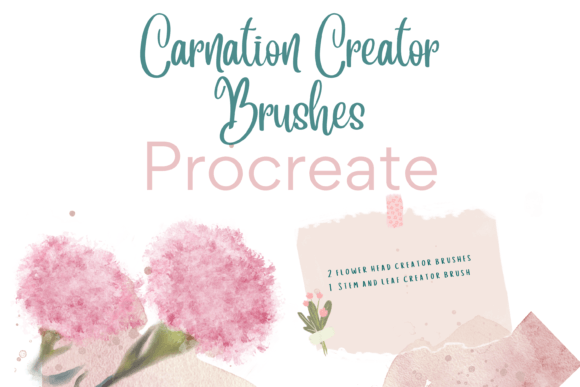
Creating Painterly Florals with Procreate Carnation Creator Brushes
Digital illustration has evolved rapidly, yet the desire for organic, hand-drawn aesthetics remains strong. For artists who love the texture of traditional media but appreciate the efficiency of digital tools, specialized brush sets are game-changers. The Procreate Carnation Creator Brushes represent a niche but powerful solution for anyone looking to produce detailed floral art without spending hours on repetitive petal rendering. These instant download, hand-drawn digital brushes are designed specifically to streamline the creation of carnations, one of the most complex flowers to paint due to their ruffled, layered structure.
Whether you are a professional illustrator working on tight deadlines or a hobbyist exploring digital painting for the first time, understanding how these tools fit into your workflow can significantly enhance your creative output. This guide explores the practical applications, technical requirements, and real-world benefits of integrating these specific brushes into your digital art toolkit.
Understanding the Toolset
At its core, this brush pack contains three unique, pressure-sensitive dynamic digital brushes. Unlike standard round brushes that require you to build shape and texture from scratch, these tools are engineered to mimic the natural growth patterns of carnations. The set includes a standard carnation creator, a color variation carnation creator, and a leaf stem creator. Each brush responds to the pressure and tilt of your Apple Pencil, allowing for organic variation in stroke width and opacity.
The significance of having a dedicated "creator" brush lies in efficiency. Painting a realistic carnation traditionally involves layering dozens of individual jagged petals, adjusting hues for depth, and refining edges to avoid a stiff, cartoonish look. With these brushes, the complex geometry of the flower is embedded in the brush tip dynamics. You can resize and recolor them to your liking, meaning a single brush can produce a tiny boutonniere or a large, lush bouquet centerpiece. This flexibility makes them suitable not just for quick sketches, but for high-resolution, painterly illustrations intended for print.
Real-World Applications for Creators and Entrepreneurs
The versatility of the Procreate Carnation Creator Brushes extends far beyond personal art projects. For small business owners and entrepreneurs, particularly those in the print-on-demand sector, speed and consistency are vital. Here is how different users can leverage these tools in realistic scenarios.
Greeting Cards and Stationery Design
Independent stationers often struggle to balance artistic quality with production volume. Creating a new line of greeting cards requires fresh designs that still feel cohesive. Using the color variation brush, a designer can quickly generate multiple floral arrangements in different palettes—soft pastels for spring, deep burgundies for winter holidays, or vibrant mixes for birthdays. Because the brushes are digital, you can duplicate layers, rotate elements, and compose balanced layouts in minutes rather than days. This allows small businesses to test market trends with lower risk and faster turnaround times.
Wedding Invitations and Event Decor
Wedding planners and freelance graphic designers frequently need custom floral motifs that match specific color schemes. A bride might request "blush pink carnations with sage green foliage." Instead of searching for stock images that may not match perfectly or hiring a traditional painter for every iteration, a designer can use the leaf stem creator and carnation brushes to build custom clips. These elements can be exported as transparent PNGs and used across invitation suites, table numbers, and menu cards, ensuring a unified brand identity for the event.
Print-on-Demand and Surface Pattern Design
For artists selling on platforms like Redbubble, Society6, or Etsy, surface pattern design is a lucrative avenue. Carnations are popular in home decor, appearing on throw pillows, wrapping paper, and wall art. The repeatability of digital brushes allows creators to scatter floral elements across a canvas, adjust spacing, and create seamless patterns. The pressure sensitivity ensures that even in a repeating pattern, the flowers do not look stamped or robotic. Each bloom retains a hand-painted feel, which adds perceived value to the final printed product.
Educational and Hobbyist Benefits
Not everyone using these brushes is selling products. For educators and hobbyists, the Procreate Carnation Creator Brushes serve as an excellent learning aid. Digital painting can be intimidating for beginners who struggle with form and anatomy. These brushes provide a scaffold, allowing students to focus on composition, color theory, and lighting without getting bogged down in the mechanics of drawing each petal.
In a classroom setting, an instructor might use these brushes to demonstrate how light interacts with complex textures. By laying down a base shape with the standard creator and then adding highlights and shadows, students can observe how depth is constructed. For scrapbookers and digital journal enthusiasts, these brushes add a personal touch to layouts. Instead of relying on generic clip art, users can create custom floral borders that match their photos and themes exactly, enhancing the emotional resonance of their memory-keeping projects.
Technical Considerations and Setup
Before purchasing or downloading, it is crucial to understand the technical ecosystem required. These files are digital brushes that will only work within the Procreate App. They are not compatible with Photoshop, Procreate Pocket, or other illustration software. To use them effectively, you need an iPad Pro (or a compatible iPad model) with the Procreate App installed and an Apple Pencil. The pressure sensitivity feature, which gives the brushes their dynamic quality, relies entirely on the hardware capabilities of the Apple Pencil. Without this setup, the brushes will not function as intended.
The installation process also requires a bit of technical familiarity. Since these are instant downloads, you will receive a compressed file, typically a .zip archive. You need a platform to download the files to, such as iCloud Drive or your iPad’s Files app. Additionally, you may need a program to unzip the files, such as iZip or the built-in unzipping feature in newer iOS versions. Once unzipped, the .brushset file can be tapped to import directly into Procreate. Users who are unfamiliar with file management on iOS should be prepared to spend a few minutes watching a tutorial on importing brushes to avoid frustration.
Making the Most of Your Digital Tools
To get the best results, consider combining these specialized brushes with standard Procreate tools. While the carnation creator handles the bulk of the flower’s structure, using a soft airbrush for ambient occlusion shadows or a textured brush for background noise can elevate the final piece. Experiment with layer modes; setting a layer to "Multiply" can help deepen shadows within the flower’s crevices, while "Overlay" can enhance vibrancy.
Remember that these brushes are tools, not replacements for artistic judgment. The color variation brush provides a starting point, but adjusting hue, saturation, and brightness manually will prevent your artwork from looking uniform. Rotate your canvas frequently to vary the angle of your strokes, mimicking the natural randomness of a real garden. By treating the Procreate Carnation Creator Brushes as a foundational element rather than a one-click solution, you can create truly unique, painterly floral art that stands out in both digital and printed formats.
Ultimately, the value of this brush pack lies in its ability to bridge the gap between technical skill and creative vision. It removes the barrier of entry for complex floral subjects, allowing artists of all levels to focus on what matters most: expression, composition, and beauty. Whether you are designing a wedding suite, creating content for social media, or simply enjoying the therapeutic process of digital painting, these tools offer a reliable, efficient, and aesthetically pleasing way to bring carnations to life.