Integrating Mary Blair Inspired Gouache Brushes into Your Digital Workflow
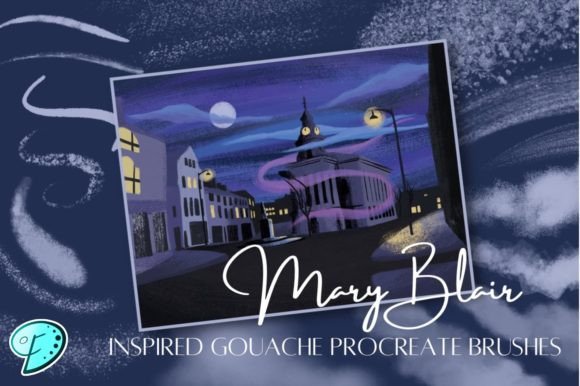
The intersection of traditional media aesthetics and digital efficiency is where modern illustrators find their most potent tools. For professionals and hobbyists alike, the challenge often lies not in the lack of software capabilities, but in the time required to replicate the organic imperfections of physical paint. This is where a specialized toolset like Mary Blair Inspired Gouache Brushes becomes essential. These are not merely decorative additions to your library; they are functional assets designed to streamline the creation of stylized, mid-century modern artwork directly within Procreate.
Understanding how to integrate these 18 distinct digital brushes into your existing creative pipeline requires a shift in perspective. Instead of viewing them as simple stamps or textures, consider them as a bridge between conceptual planning and final execution. Whether you are a freelance illustrator working on tight deadlines, a marketer designing social media assets, or an educator creating engaging visual materials, the workflow benefits of using purpose-built brushes are significant. This article explores the practical implementation of these brushes, focusing on preparation, execution, and long-term consistency in your digital art process.
Preparation and Setup: Optimizing Your Procreate Environment
Before diving into creation, proper setup ensures that the Mary Blair Inspired Gouache Brushes perform consistently across different projects. Since these brushes are designed specifically for Procreate, compatibility is generally straightforward, but organization is key to maintaining efficiency. When you first import the set of 18 brushes, avoid leaving them in the default "Imported" folder. Instead, create a dedicated brush set labeled clearly, such as "Mid-Century Gouache" or "Blair Style Tools." This segregation allows for quick access during high-pressure workflows, reducing the cognitive load of searching for the right tool amidst hundreds of defaults.
It is also crucial to understand the underlying mechanics of gouache simulation. Unlike watercolor, which relies heavily on transparency and flow, gouache is opaque and matte. The digital brushes in this set mimic this behavior by adjusting opacity, flow, and texture mapping. To get the best results, review the settings of each brush in the Brush Studio. Pay attention to the "Grain" and "Rendering" tabs. While the presets are optimized for immediate use, slight adjustments to the grain scale can help match the resolution of your specific canvas size. For large-format prints, you may need to increase the grain detail to prevent pixelation, whereas screen-only graphics may benefit from softer edges.
Another preparatory step involves color palette selection. Mary Blair’s work is renowned for its bold, unconventional color combinations. Using these brushes effectively requires a complementary palette. Before starting a sketch, curate a custom color palette in Procreate that reflects the vibrant, flat tones typical of mid-century design. Having these colors ready alongside your Mary Blair Inspired Gouache Brushes creates a cohesive environment where tool and color work in harmony, reducing the friction of decision-making during the painting phase.
Execution: Layering and Texture in the Creative Process
The core advantage of using this brush set lies in its ability to replicate the layered nature of traditional gouache. In a traditional workflow, an artist might wait for layers to dry before applying new ones to prevent muddying. In Procreate, you have the flexibility of digital blending, but to achieve the authentic Blair aesthetic, you should adopt a disciplined layering strategy. Start with broad, flat shapes using the larger brushes in the set. These initial layers establish the composition and color blocking, which are hallmarks of Blair’s style.
As you move into the detailing phase, switch to the smaller, more textured brushes within the 18-brush collection. These tools are designed to add the subtle irregularities that make digital art feel hand-crafted. Use them to introduce edge variation, slight color shifts, and texture overlays. The key here is restraint. Over-using texture can clutter the image and detract from the clean, graphic quality of the style. Instead, apply these textures strategically to focal points or areas where light and shadow interact. This approach maintains visual clarity while adding depth and interest.
Consider the interaction between these brushes and Procreate’s blending modes. While gouache is opaque, digital layers offer opportunities for enhancement. Experiment with "Multiply" for shadows and "Overlay" or "Soft Light" for subtle color glazes. However, keep the primary painting on normal layers to preserve the matte finish characteristic of the medium. The Mary Blair Inspired Gouache Brushes are engineered to look best when used with minimal digital manipulation, allowing the brush engine to do the heavy lifting regarding texture and edge quality.
Workflow Integration for Professionals and Businesses
For entrepreneurs, marketers, and small business owners, time is a critical resource. Integrating specialized tools like these brushes into your content creation workflow can significantly reduce production time without sacrificing quality. For instance, if you are creating a series of social media posts or blog headers, establishing a template using these brushes ensures brand consistency. By saving a base file with your preferred brush settings and color palettes, you can rapidly generate new visuals that maintain a unified aesthetic. This consistency is vital for brand recognition and professional presentation.
Educators and publishers can also leverage this toolset to create engaging visual aids. The playful yet structured nature of Mary Blair’s style is highly effective for capturing attention and simplifying complex concepts. When creating illustrations for textbooks, presentations, or online courses, use the Mary Blair Inspired Gouache Brushes to produce clear, appealing graphics. The opacity and texture controls allow for the creation of diagrams and characters that are both informative and visually stimulating. Furthermore, because the brushes are digital, edits are non-destructive and easily reversible, facilitating rapid iteration based on feedback from students or clients.
Freelance illustrators will find these brushes particularly useful for meeting tight deadlines. The pre-configured textures eliminate the need to spend hours creating custom brushes or scanning traditional media. This efficiency allows you to focus more on composition and storytelling, which are the true value drivers in client work. Additionally, having a distinctive style facilitated by these tools can help differentiate your portfolio in a crowded market. Clients often seek a specific look, and being able to deliver a consistent, high-quality mid-century modern aesthetic can open up niche opportunities in advertising, editorial illustration, and product design.
Quality Control and Long-Term Maintenance
To ensure the longevity and effectiveness of your Mary Blair Inspired Gouache Brushes, regular quality control checks are necessary. As Procreate updates its software, brush engines may undergo changes that affect performance. Periodically test your brushes on new versions of the app to ensure they behave as expected. If you notice changes in texture or opacity, revisit the Brush Studio settings to recalibrate them. Keeping a backup of your original brush set is also advisable, allowing you to restore defaults if customization leads to undesirable results.
Organization extends beyond the initial setup. As you use the brushes, you may discover that certain tools work better for specific tasks. Consider creating sub-sets or favorites lists within Procreate for your most-used brushes. This customization enhances workflow efficiency by putting your most valuable tools at your fingertips. Additionally, document your successful combinations of brushes and colors. Keeping a simple log or screenshot library of effective techniques can serve as a reference for future projects, reducing the learning curve when returning to the style after a break.
Finally, consider the broader context of your digital asset management. These brushes are part of a larger ecosystem of tools and resources. Integrate them with other assets such as texture overlays, custom fonts, and vector elements to create comprehensive design systems. By viewing the Mary Blair Inspired Gouache Brushes as one component of a holistic creative toolkit, you can maximize their potential and achieve higher levels of productivity and artistic satisfaction. This strategic approach ensures that your investment in digital tools yields consistent, high-quality results across all your creative endeavors.