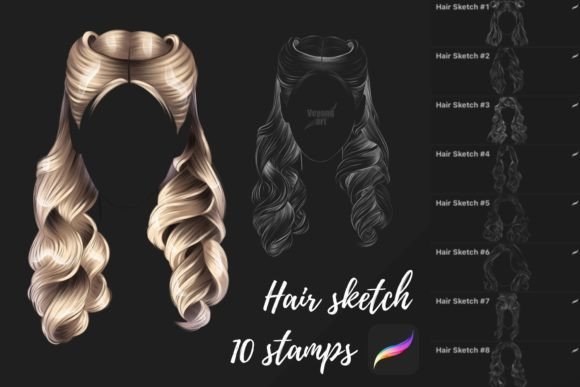
Mastering Digital Hair Textures with Specialized Procreate Brushes
The difference between a competent digital portrait and a captivating one often lies in the smallest details. Among these, hair is frequently the most challenging element to render convincingly. It requires a delicate balance of flow, volume, and texture that traditional pencil or paint brushes struggle to replicate efficiently. This is where specialized tools like Hair Sketch Brushes become indispensable for modern digital artists. Designed specifically for the iPad ecosystem, these assets streamline the creative process, allowing illustrators, concept artists, and hobbyists to achieve professional-grade results without getting bogged down in tedious manual detailing.
In an era where digital art consumption is at an all-time high, the demand for high-quality, realistic character design has surged. Whether for freelance commissions, indie game development, or social media content, creators are under pressure to produce work that stands out. The evolution of digital painting software has shifted from merely replicating traditional media to offering unique capabilities that leverage the power of touch interfaces and pressure sensitivity. Understanding how to utilize niche tools like hair-specific brushes is no longer just a shortcut; it is a fundamental skill for anyone serious about digital illustration.
The Evolution of Digital Hair Rendering
For years, digital artists relied on standard round brushes to build up hair strand by strand. While this method offers total control, it is incredibly time-consuming and often results in stiff, unnatural-looking locks. As tablet technology improved, so did the sophistication of brush engines. Developers began creating custom brushes that mimic the chaotic yet structured nature of hair groups rather than individual strands. This shift represents a broader trend in digital art: the move toward smart assets that understand the material they are trying to represent.
Hair Sketch Brushes exemplify this evolution. They are not merely textured stamps; they are engineered to respond to the tilt, pressure, and speed of the Apple Pencil. This responsiveness allows for dynamic variation in line weight and opacity, mimicking the way light catches different sections of hair. For professionals working on tight deadlines, this technological leap means they can focus more on composition and lighting rather than spending hours on repetitive stroke patterns. The result is artwork that feels organic and alive, reflecting the natural movement of hair rather than a static, painted mask.
Why Platform Specificity Matters
One crucial aspect of these digital assets is their compatibility. It is important to note that these 10 Procreate brushes are optimized exclusively for the Procreate application on iPad. They are not suitable for other programs and applications such as Photoshop, Clip Studio Paint, or Corel Painter. This limitation is not a drawback but rather a testament to the deep integration between the brush settings and Procreate’s specific rendering engine.
Procreate utilizes a unique brush file format (.brushset) that leverages the iPad’s hardware capabilities, including its gyroscope and advanced pressure sensors. When you purchase this digital file, you are acquiring a set of parameters tuned to interact with Procreate’s smudge, blend, and layer modes in ways that other software cannot replicate. Attempting to convert these files for use in other platforms would strip away the nuanced behaviors that make them effective. For creators, this underscores the importance of choosing tools that align with their primary workflow. If your studio or personal practice is rooted in the Apple ecosystem, these brushes offer a level of fidelity that generic alternatives simply cannot match.
Practical Applications for Creators and Businesses
The utility of specialized hair brushes extends beyond individual hobbyists. For entrepreneurs and business owners in the creative industry, efficiency directly impacts profitability. Freelance illustrators who can reduce the time spent on rendering hair by thirty to fifty percent can take on more clients or dedicate more energy to refining other aspects of their pieces. This efficiency gain is particularly valuable in industries like character design for animation, where multiple angles and expressions of the same character must be produced consistently.
Consider a marketer creating custom illustrations for a brand’s social media campaign. Using Hair Sketch Brushes allows for rapid iteration. They can experiment with different hairstyles and colors quickly, responding to client feedback in real-time. Similarly, educators teaching digital art can use these tools to demonstrate complex texturing techniques without overwhelming students with technical minutiae. By providing a solid foundation, these brushes allow learners to focus on artistic principles like shape, value, and color theory.
- Character Design: Rapidly prototype diverse hairstyles for games and comics.
- Portrait Commission: Enhance realism in client portraits with minimal effort.
- Concept Art: Quickly visualize character silhouettes and mood.
- Educational Content: Teach texture and flow without getting stuck on mechanics.
Integrating Stamps into Your Workflow
In addition to sketching tools, this package includes 10 Procreate brushes stamps. Stamps function differently from standard brushes; they are pre-designed shapes or textures that can be placed onto the canvas with a single tap. In the context of hair creation, stamps can be invaluable for adding intricate details like braids, curls, or accessory elements that would be difficult to draw freehand. However, their effective use requires a strategic approach.
Relying too heavily on stamps can lead to repetitive, cookie-cutter results. The key is to use them as a base layer or a starting point. Once a stamp is placed, artists should use standard brushes to blend the edges, adjust the lighting, and integrate the stamped element into the overall composition. This hybrid approach combines the speed of automation with the uniqueness of hand-painting. It reflects a modern workflow where technology assists rather than replaces artistic intent. For businesses, this means maintaining a high standard of quality while scaling production capabilities.
Navigating the Digital Asset Market
The market for digital art resources is saturated, making it essential for users to discern quality from quantity. When evaluating tools like Hair Sketch Brushes, look for evidence of thoughtful design. Do the brushes offer variety in terms of thickness and flow? Are they organized in a way that makes them easy to access during a creative session? Since this is a digital file, immediate accessibility is a given, but the true value lies in how well the creator has tested and refined the brushes for real-world scenarios.
Moreover, understanding the limitations of these tools is part of professional maturity. As noted, these brushes are not suitable for other programs and applications. This specificity requires users to commit to a particular software ecosystem. For those already invested in Procreate, this is a seamless addition. For others, it may prompt a reevaluation of their toolset. In either case, the decision should be driven by workflow needs rather than fleeting trends. The goal is to build a toolkit that enhances your unique artistic voice, not one that dictates it.
Future-Proofing Your Creative Practice
As digital art continues to evolve, the line between traditional skill and technological assistance will blur further. Tools like Hair Sketch Brushes are not crutches; they are extensions of the artist’s hand. They allow creators to push boundaries and explore styles that might have been too labor-intensive in the past. For professionals, staying updated with such tools is a form of career insurance. It ensures that their skills remain relevant in a rapidly changing market where clients expect both speed and high fidelity.
Furthermore, the community aspect of digital art cannot be overlooked. Sharing techniques and custom brushes has become a vital part of the creative economy. By mastering specialized tools, artists can contribute to this knowledge exchange, offering tutorials, breakdowns, and insights that help others grow. This collaborative spirit drives innovation and raises the standard for digital art globally. Whether you are a seasoned professional or a curious beginner, integrating these specialized brushes into your practice is a step toward more efficient, expressive, and impactful artwork.
In conclusion, the adoption of Hair Sketch Brushes and accompanying stamps represents a strategic choice for modern digital artists. It acknowledges the realities of contemporary workflows, where time is scarce and expectations are high. By leveraging tools designed specifically for Procreate, creators can achieve superior results while maintaining their unique artistic identity. As the digital landscape continues to shift, those who adapt and refine their toolkits will find themselves best positioned to thrive in the creative industries of tomorrow.