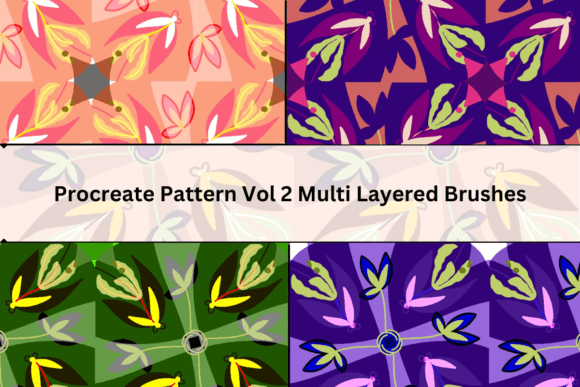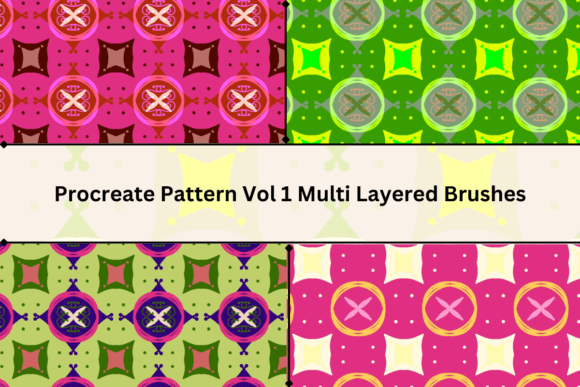
Mastering Pattern Design with Procreate Vol 1 Multi Layered Brushes
In the evolving landscape of digital illustration, efficiency often dictates the quality and volume of output a creator can achieve. For professionals using iPad-based workflows, Procreate Vol 1 Multi Layered Brushes represents a specialized toolset designed to streamline the creation of complex, repeating patterns. Developed by Akanksha Rawat of Design2Last, this collection is not merely a set of standard stamping tools but a structured system intended to build depth and texture through layering. Understanding how to integrate these assets into a professional workflow requires more than just installation; it demands an appreciation for non-destructive editing practices and a clear grasp of opacity dynamics.
The Architecture of the Brush Set
The core value proposition of Procreate Vol 1 Multi Layered Brushes lies in its modular design. The set includes six distinct brushes, each engineered to contribute a specific visual element to a larger composition. Unlike traditional single-stamp brushes that produce a flat, static image, these tools are designed to interact. When used correctly, they allow artists to construct intricate motifs that mimic the complexity of hand-drawn textiles or wallpaper designs without the hours of manual repetition typically required.
The "multi-layered" aspect refers to the internal structure of the brush strokes. Each brush deposit contains varied densities and textures that simulate the look of multiple passes. This characteristic is particularly valuable for marketers and surface pattern designers who need to create assets that feel organic rather than digitally sterile. The brushes are versatile enough to be used in any order, providing a high degree of creative flexibility. Whether you are designing packaging for a small business, creating backgrounds for educational materials, or developing unique content for social media campaigns, the ability to rapidly prototype pattern variations is a significant productivity booster.
Technical Best Practices and Workflow Stability
While the creative potential of these brushes is high, their technical performance relies heavily on user discipline. A critical observation for any professional adopting this toolset is the importance of configuration management. The developer explicitly notes that users must set a restore point for each brush before beginning any serious work. This step is non-negotiable for maintaining workflow consistency. Digital brush settings in Procreate can be easily altered accidentally through pressure sensitivity adjustments or random parameter tweaks. Without a saved restore point, reverting to the original, optimized state can be time-consuming and frustrating.
Furthermore, industry best practices suggest working with duplicates of the original brushes rather than the masters themselves. By creating copies, you preserve the integrity of the source files provided by Design2Last. This approach allows for experimentation with flow, jitter, and size limits without risking the baseline performance of the tool. It is a simple precaution that separates amateur experimentation from professional asset management. For freelancers and agencies managing multiple projects, this habit ensures that a corrupted brush setting in one project does not negatively impact subsequent client deliverables.
Understanding Opacity and Layering Dynamics
The functionality of Procreate Vol 1 Multi Layered Brushes is deeply tied to opacity settings. The documentation indicates that these brushes are designed to be used in a specific order when operating at normal opacity. This sequential usage likely builds the pattern from background textures to foreground details, ensuring that the visual hierarchy remains balanced. Deviating from this order at full opacity may result in visual clutter or obscured details, undermining the aesthetic coherence of the design.
However, the system offers considerable freedom when opacity is adjusted. Users can employ the brushes in any order if they reduce the opacity, allowing for subtle blending and ghosting effects. This feature is particularly useful for creating watercolor-style washes or muted, vintage-inspired backgrounds. The ability to toggle between strict sequential layering and freeform low-opacity stacking makes the set adaptable to various artistic styles. For educators and bloggers creating visual aids, this flexibility means a single toolset can serve multiple pedagogical or illustrative purposes, from bold, high-contrast graphics to soft, atmospheric backdrops.
Real-World Applications and Audience Fit
Who benefits most from integrating Procreate Vol 1 Multi Layered Brushes into their toolkit? The primary audience includes surface pattern designers, textile artists, and digital marketers who require consistent, high-quality visual assets. For small business owners handling their own branding, these brushes offer a way to create proprietary patterns for packaging, website headers, or promotional materials without hiring external illustrators. The speed of iteration allows for rapid A/B testing of design concepts, a crucial advantage in fast-paced marketing environments.
Educators and publishers also find value in such tools. Creating engaging worksheets, book covers, or presentation slides often requires unique decorative elements that avoid the generic look of stock photography. With these brushes, an educator can generate custom borders and backgrounds that align perfectly with the thematic content of their lesson plans. Similarly, freelance illustrators can use the set to add textured depth to character backgrounds or environmental designs, enhancing the overall production value of their commissions.
The practical value extends to hobbyists seeking to elevate their digital art skills. While the learning curve involves understanding the restore points and opacity rules, the payoff is a deeper comprehension of how digital layers interact. This knowledge is transferable to other areas of digital design, making the investment in learning this specific brush set worthwhile for serious enthusiasts aiming to transition into professional roles.
Evaluating Quality and Long-Term Value
When assessing the long-term value of Procreate Vol 1 Multi Layered Brushes, one must consider reliability and consistency. Created by Akanksha Rawat of Design2Last, the brushes reflect a focused design philosophy. They are not bloated with unnecessary features but are instead refined for a specific task: pattern generation. This specificity is a strength. In a market saturated with thousands of generic brushes, a tool that solves a particular problem—efficient pattern creation—is often more valuable than a broad, unfocused collection.
The usability of the set is high, provided the user adheres to the recommended guidelines. The requirement to manage restore points and duplicates is a minor administrative task that pays dividends in stability. Once configured, the brushes perform consistently across different canvas sizes and resolutions, a key factor for professionals who may need to scale designs from social media posts to large-format prints. The visual output is clean and professional, avoiding the pixelation or artifacting common in poorly constructed custom brushes.
Limitations do exist. The reliance on specific ordering for normal opacity usage may feel restrictive to artists accustomed to completely freeform painting. Additionally, the effectiveness of the brushes depends on the user’s ability to blend them with other tools. They are components of a workflow, not a standalone solution. Artists must still possess fundamental skills in color theory, composition, and layer management to fully leverage the potential of the set. However, for those with foundational skills, these brushes act as a force multiplier, significantly reducing the time required to achieve complex textural effects.
Final Recommendations for Integration
To maximize the utility of Procreate Vol 1 Multi Layered Brushes, start by setting up a dedicated template file in Procreate. Include your duplicated brushes with pre-set restore points in this template. This ensures that every new project begins with a stable, ready-to-use environment. Experiment with the opacity variations to discover unique blends, but always keep a reference of the standard sequential order for when you need reliable, predictable results.
Consider combining these brushes with Procreate’s built-in symmetry tools or animation assist features to create even more dynamic patterns. The interplay between the multi-layered strokes and geometric symmetry can yield sophisticated designs suitable for high-end commercial applications. Ultimately, this brush set is a robust resource for creators who value precision, efficiency, and professional-grade outcomes in their digital pattern work.