Musical Instruments Stamp Brushes
Integrating musical elements into digital design often presents a unique challenge for creators. Whether you are illustrating a concert poster, designing educational materials for music students, or crafting social media graphics for a band, drawing instruments from scratch can be time-consuming and technically demanding. Achieving the correct proportions of a violin, the intricate details of a saxophone, or the perspective of a drum kit requires a level of artistic skill that not every designer possesses. This is where specialized tools like Musical Instruments Stamp Brushes become invaluable assets in your creative workflow. By leveraging pre-designed, high-quality stamps, you can bypass the tedious process of manual illustration while maintaining a professional and cohesive aesthetic in your projects.
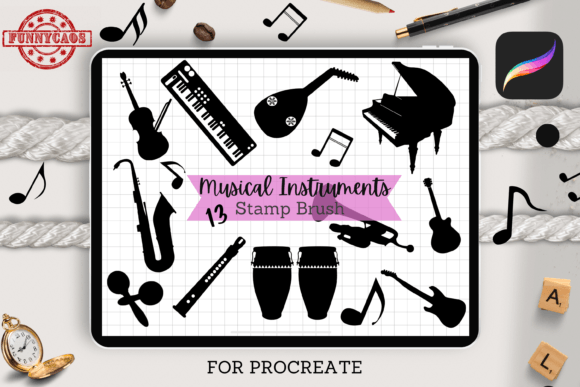
This specific design set offers thirteen distinct musical instrument stamps tailored for use within the Procreate ecosystem. The primary value proposition here is efficiency without sacrificing quality. For professionals and hobbyists alike, time is a critical resource. Spending hours perfecting the shading on a guitar neck might be necessary for a hyper-realistic fine art piece, but it is often unnecessary for commercial designs, worksheets, or digital stickers where clarity and speed are prioritized. These brushes allow you to place complex imagery onto your canvas with a single tap, freeing you to focus on composition, color theory, and overall layout rather than getting bogged down in repetitive drawing tasks.
Streamlining Your Creative Workflow
The core functionality of these Musical Instruments Stamp Brushes lies in their ease of use. Once imported into Procreate, they function as standard brush stamps. This means you do not need to navigate complex layer structures or import individual PNG files for each instrument. Instead, you have a unified toolset at your fingertips. You can switch between a piano, a trumpet, or a microphone instantly, allowing for rapid ideation and prototyping. This fluidity is particularly beneficial for entrepreneurs and marketers who need to produce content quickly. For instance, if you are managing social media for a local music festival, you can create multiple post variations in a fraction of the time it would take to source stock images or draw elements manually.
Furthermore, the flexibility of these stamps enhances their utility. Each stamp is fully customizable in terms of size and color. This is a crucial feature for maintaining brand consistency. If your project requires a monochromatic look, you can adjust the stamps to match your palette seamlessly. If you need a subtle background element, you can reduce the opacity and size to create a watermark effect. Conversely, you can scale them up to serve as the focal point of a design. This adaptability ensures that the brushes do not feel rigid or limited to a single style, making them suitable for a wide range of artistic directions, from minimalist modern designs to vibrant, playful illustrations.
Practical Applications for Diverse Creators
The versatility of this thirteen-stamp collection opens up numerous possibilities across different industries and creative pursuits. Here are several practical scenarios where these brushes can significantly enhance your output:
- Educational Materials: Music teachers and educators can use these stamps to create engaging worksheets, flashcards, and presentation slides. Instead of searching for clipart that may have inconsistent styles or licensing issues, you can generate clean, uniform visuals for note-taking guides, instrument identification quizzes, or classroom decorations.
- Digital Stickers and Planning: For creators who sell digital planners or sticker packs, these instruments provide ready-made assets. You can combine them with other decorative elements to create themed kits for musicians, music students, or concert-goers. The ability to recolor them allows you to offer variety within your product lines without creating new drawings from scratch.
- Branding and Logo Design: While a logo often requires custom vector work, these stamps are excellent for initial concepting or for small business owners who need quick, professional-looking graphics for flyers, business cards, or website banners. A music tutor, for example, could use a stylized piano stamp as part of a promotional graphic for their lessons.
- Event Promotion: Designers working on invitations for recitals, concerts, or music-themed parties can use these stamps to add immediate context and visual interest. They help establish the theme quickly, ensuring the audience understands the nature of the event at a glance.
Each of these use cases highlights how the Musical Instruments Stamp Brushes solve specific problems related to time management and resource availability. By providing a reliable library of instruments, the set removes the friction associated with finding appropriate visuals, allowing you to move from concept to completion more efficiently.
Technical Requirements and Compatibility
It is essential to understand the technical environment required to utilize these brushes effectively. This design set is exclusively compatible with Procreate, the popular digital illustration app for iPad. This specificity is both a limitation and a strength. On one hand, it means you cannot use these brushes in Photoshop, Illustrator, or other desktop-based software. On the other hand, it ensures that the brushes are optimized for the Procreate engine, offering smooth performance and seamless integration with the app’s native features.
To use this set, you will need an iPad (such as the iPad Pro) and an Apple Pencil. The brushes are not designed for touch-only input or other stylus brands, as the pressure sensitivity and tilt recognition provided by the Apple Pencil enhance the user experience, even when using stamp brushes. Upon purchase, you will receive a single ZIP folder containing the brushset file. The installation process is straightforward: unzip the file, tap the brushset in Procreate, and select "Import." Within seconds, the thirteen instruments will appear in your brush library, ready for use.
For those who are new to Procreate or digital art, this simplicity is a significant advantage. There are no complex plugins to install or compatibility issues to troubleshoot. However, if you primarily work on a desktop computer or prefer vector-based workflows, you should consider whether this raster-based brush set aligns with your current tools. If you are already invested in the Apple ecosystem and use Procreate for your creative projects, these brushes integrate naturally into your existing workflow.
Maximizing Value Through Customization
While the stamps provide a strong foundation, the true artistic value comes from how you manipulate them. Do not hesitate to experiment with blending modes, layer effects, and additional textures. For example, placing a guitar stamp on a textured paper background and adjusting the blend mode to "Multiply" can create a realistic, printed look. Adding subtle shadows or highlights around the stamps can give them depth and make them feel more integrated into the scene rather than just pasted on top.
Moreover, combining these instrument stamps with hand-lettering or other Procreate brushes can result in unique, hybrid designs. You might use a bold, handwritten font for a band name and pair it with a subtle drum kit stamp in the background. This approach allows you to maintain a handmade, organic feel while benefiting from the precision and speed of digital stamps. The key is to treat the stamps as building blocks rather than final products. By adding your own creative touches, you ensure that your work remains original and distinctive.
If you require more specific details about the design set or have questions about compatibility with your specific iPad model, do not hesitate to contact the creator. Understanding the nuances of your tools is the first step toward mastering them. By incorporating Musical Instruments Stamp Brushes into your digital toolkit, you equip yourself with a practical solution for enhancing productivity, improving visual consistency, and expanding your creative possibilities in the realm of digital design.