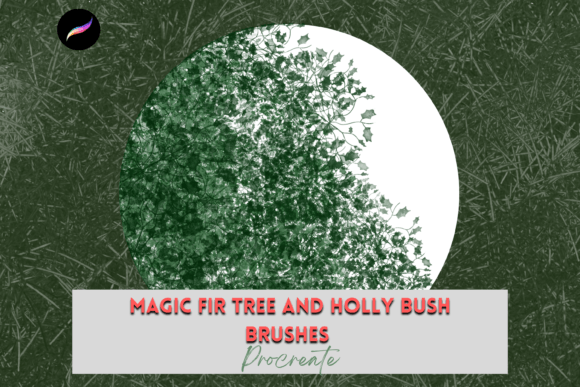
Procreate Magic Fir & Holly Brushes X4
The transition from traditional media to digital illustration often hinges on the tactile feel of the tools. For artists who cherish the organic imperfections of hand-drawn textures, finding the right digital equivalent can be a challenge. This is where specialized toolsets become indispensable. The Procreate Magic Fir and Holly Brushes X4 offer a curated solution for creators seeking to infuse their digital work with the warmth and authenticity of nature-inspired festive elements. These are not merely stamps; they are pressure-sensitive instruments designed to mimic the nuanced behavior of real ink and paint on paper, providing a bridge between classic botanical illustration and modern digital efficiency.
The Power of Hand-Drawn Digital Textures
In an era where AI-generated imagery and sterile vector graphics dominate the visual landscape, there is a growing appreciation for art that feels human. The hand-drawn quality of these brushes provides that essential touch of imperfection. Each stroke carries the weight of the artist’s hand, varying in opacity and thickness based on the pressure applied via the Apple Pencil. This dynamic response allows for a level of expression that static clip art simply cannot match.
What makes this specific pack interesting is its focused versatility. By limiting the selection to four unique, high-quality brushes centered around fir and holly motifs, the set avoids the clutter of oversized libraries. Instead, it offers depth. Users can layer these elements to create dense, realistic foliage or use them sparingly for minimalist accents. The result is artwork that feels grounded and authentic, whether it is viewed on a retina display or printed on textured cardstock.
Expanding Creative Possibilities Beyond the Screen
While the primary environment for these tools is the iPad, their utility extends far beyond digital canvases. The true value of the Procreate Magic Fir and Holly Brushes X4 lies in their adaptability across various mediums and industries. Because the output is high-resolution raster data, it translates seamlessly into physical products.
Greeting Cards and Stationery
For independent stationers and hobbyists, holiday cards represent a significant seasonal opportunity. Using these brushes, you can design bespoke greetings that stand out from mass-produced options. Imagine a simple, elegant border of holly leaves framing a handwritten message, or a textured fir branch serving as a backdrop for typography. The pressure sensitivity allows you to create delicate, wispy tips for a soft winter feel, or press harder for bold, graphic statements. These designs can be printed at home on heavy cotton paper or sent to professional printers for a polished finish.
Scrapbooking and Digital Planning
Digital scrapbooking has evolved into a sophisticated hobby, blending photography with illustrative elements. These brushes allow planners and scrapbookers to add custom decorative frames to their monthly layouts. Instead of relying on generic stickers, users can draw unique embellishments that match their specific color palettes. The ability to resize and recolor each stroke means that a single brush can yield hundreds of variations, ensuring that no two pages look exactly alike. This fosters a sense of originality and personal connection to the documented memories.
Print on Demand and Surface Design
Entrepreneurs utilizing print-on-demand services can leverage these assets to create niche products. Wrapping paper, for instance, benefits greatly from repeating patterns that do not look mechanically tiled. By hand-drawing elements with these brushes, designers can create seamless patterns that retain an organic flow. Similarly, these motifs work exceptionally well on tote bags, throw pillows, and tea towels. The natural theme appeals to consumers looking for sustainable, earthy aesthetics in their home goods.
Technical Workflow and Installation
To fully utilize the potential of these tools, understanding the technical requirements is crucial. These files are digital brushes exclusively compatible with the Procreate App. They will not function in Photoshop, Procreate Pocket, or other illustration software. Therefore, having an iPad Pro (or compatible iPad model) and an Apple Pencil is not just recommended; it is a necessity. The pressure sensitivity of the Apple Pencil is what unlocks the dynamic range of the bristles, allowing for the subtle transitions between thick and thin lines.
The installation process is straightforward but requires a few preparatory steps. Since the files are delivered as a digital download, you will need a method to transfer them to your iPad. Most users find iCloud Drive or AirDrop to be the most efficient platforms for this transfer. Once the file is on your device, you will need an application capable of unzipping compressed files, such as iZip or the native Files app functionality in newer iOS versions.
- Download the brush pack to your preferred cloud storage or direct download location.
- Unzip the file to reveal the individual
.brushsetor.procreatefiles. - Tap on the file and select "Open in Procreate."
- The brushes will automatically import into a new, named folder within your Procreate brush library.
This seamless integration ensures that you can start creating immediately without complex configuration. Keeping your brush sets organized in named folders helps maintain a efficient workflow, especially when working on large projects with multiple asset types.
Strategies for Consistent and Professional Results
Creating beautiful art is one thing; creating consistent, professional-grade designs is another. Here are practical recommendations for getting the most out of these brushes:
- Layer Management: Use separate layers for different elements of your composition. Keep your fir branches on one layer and holly berries on another. This allows you to adjust opacity, blend modes, and colors independently, giving you greater control over the final depth and dimension of the piece.
- Color Palette Harmony: While the brushes come with default settings, experimenting with custom palettes can elevate your work. Try muted, desaturated greens for a vintage look, or deep, rich emeralds for a luxurious feel. Avoid using pure black for outlines; instead, use a dark green or brown to maintain the natural aesthetic.
- Texture Integration: To enhance the hand-drawn feel, consider placing a subtle paper texture overlay on top of your artwork. Set the blend mode to "Multiply" or "Overlay" at a low opacity. This adds a tactile quality that complements the organic nature of the fir and holly strokes.
- Variation through Rotation: Do not rely on a single orientation for your elements. Rotate your canvas frequently while drawing. This natural variation in angle prevents repetitive patterns and makes the foliage appear more random and lifelike.
Adapting to Different Audiences and Contexts
Different users will approach these brushes with distinct goals. Marketers might use them to create social media graphics that stand out during the holiday season, aiming for a warm, inviting brand voice. Educators could employ them in teaching materials to illustrate botanical concepts or to create engaging seasonal worksheets. Freelance illustrators might integrate them into client projects for editorial pieces or book covers.
Regardless of the end goal, the key is intentionality. Use the brushes to support the narrative of your design rather than overpowering it. In minimalist designs, let a single sprig of holly speak volumes. In complex compositions, use the fir textures to build background depth. By understanding the strengths of the Procreate Magic Fir and Holly Brushes X4, creators can produce work that is not only visually appealing but also emotionally resonant.
Ultimately, these tools are about empowering creativity. They remove the technical barriers of creating complex botanical illustrations from scratch, allowing artists to focus on composition, color, and storytelling. Whether you are designing a wedding invitation, a holiday card, or a piece of wall art, these brushes provide the foundational elements needed to bring your vision to life with clarity and charm.