Procreate Ruffles Design Brushes: A Practical Evaluation for Digital Artists
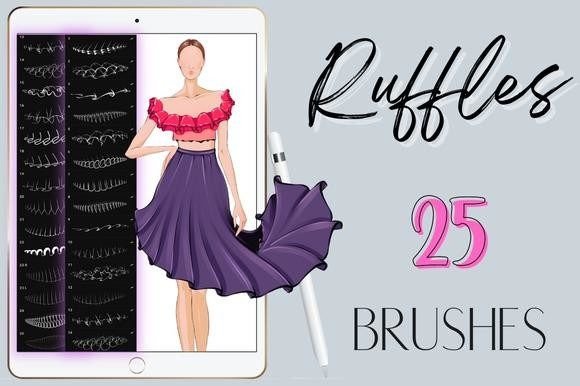
Digital illustration has evolved to offer specialized tools that significantly reduce the time required for complex textures and patterns. Among these tools, Procreate Ruffles Design Brushes have emerged as a popular resource for artists seeking efficiency in rendering fabric, organic forms, and decorative elements. This collection typically includes 25 distinct seamless brushes designed specifically for the Procreate application on iPad. For artists evaluating whether this asset pack aligns with their workflow, understanding the technical requirements, practical benefits, and inherent limitations is essential.
Understanding the Toolset
The core function of Procreate Ruffles Design Brushes is to automate the creation of ruffled textures. In traditional digital painting, drawing ruffles manually requires a keen understanding of light, shadow, and fabric physics. It is a time-consuming process that involves sketching folds, adding depth, and refining edges. These brushes bypass much of that manual labor by providing pre-configured stamps or strokes that mimic the appearance of ruffles.
The package delivers a single zip file containing 25 different seamless brushes. "Seamless" in this context implies that the brush stroke can be repeated or extended without visible breaks or jarring transitions, allowing for continuous lines of texture. The design philosophy behind these tools is simplicity and speed. Users are instructed to simply select their desired color within the Procreate interface and apply the brush. There is no need for complex layer blending modes or additional adjustment layers to achieve the basic effect, making it accessible for beginners and efficient for professionals.
Why Artists Consider Ruffle Brushes
The primary motivation for adopting Procreate Ruffles Design Brushes is workflow optimization. Fashion illustrators, character designers, and concept artists often face tight deadlines. Rendering intricate clothing details, such as lace, frills, or layered skirts, can consume hours of production time. By utilizing a specialized brush set, an artist can block in these details in seconds rather than minutes.
Beyond speed, consistency is a significant factor. Hand-drawing multiple ruffles can lead to inconsistencies in shape and spacing, which may distract from the overall composition. A digital brush ensures uniformity in the pattern, providing a cohesive look across the artwork. This is particularly useful for background elements or secondary characters where hyper-realistic, unique folds are less critical than visual clarity and aesthetic appeal.
Benefits and Practical Applications
When integrated effectively, these brushes offer several tangible benefits. First, they lower the barrier to entry for artists who struggle with rendering fabric. Beginners who find the physics of cloth difficult to master can still produce visually appealing results, boosting confidence and encouraging further practice. Second, the versatility of the 25 different brush variations allows for experimentation. Some brushes may produce tight, dense ruffles suitable for lace, while others may create loose, flowing waves ideal for silk or chiffon.
The ability to use any color seamlessly is another practical advantage. Because the brushes rely on the foreground color selected in Procreate, artists can maintain their established color palettes without needing to edit the brush assets themselves. This flexibility supports rapid iteration during the conceptual phase of a project.
Situations where this toolset is a strong fit include:
- Fashion Illustration: Quickly adding trim and detail to garment sketches.
- Character Design: Enhancing costumes with decorative elements without excessive detailing.
- Pattern Design: Creating repeating motifs for textiles or wallpapers.
- Rapid Prototyping: Blocking in complex shapes during the early stages of a composition.
Technical Requirements and Limitations
It is crucial to address the technical constraints before purchasing or downloading Procreate Ruffles Design Brushes. These are digital assets exclusively compatible with the Procreate app on iPad. They will not function in Photoshop, Clip Studio Paint, Procreate Pocket, or any desktop-based software. Furthermore, optimal performance requires an Apple Pencil or a third-party stylus that supports pressure sensitivity. Without pressure sensitivity, the brushes cannot respond to the varying force of the user’s hand, resulting in flat, uniform strokes that lack the dynamic range intended by the designer.
Another consideration is the nature of "stamp" or "shape" brushes. While they save time, they can sometimes appear repetitive if overused. If an artist relies solely on these brushes for an entire garment, the artwork may look artificial or generic. To maintain a high level of artistic integrity, these tools should be used as a base or an accent rather than a complete replacement for manual rendering skills.
Evaluating Alternatives
While Procreate Ruffles Design Brushes offer convenience, they are not the only solution. Artists should consider alternatives based on their specific needs. For those seeking maximum control and realism, manual painting remains the gold standard. Learning to observe and replicate how light interacts with folded fabric provides a foundational skill set that no brush can replace. This approach is necessary for high-end editorial illustrations or realistic portraiture where every fold must be anatomically and physically accurate.
Additionally, Procreate’s native brush library contains various textured brushes that can be customized. Advanced users may prefer to create their own ruffle brushes using Procreate’s brush studio. This allows for total customization of grain, shape, and dynamics, though it requires a steeper learning curve and more initial setup time. For artists who already possess strong drawing skills, the time saved by using pre-made ruffle brushes might be negligible compared to the time spent adjusting them to fit a specific style.
Decision-Making Insights
To determine if Procreate Ruffles Design Brushes are a worthwhile investment, consider your current workflow bottlenecks. If you frequently find yourself stalled by the tedious process of drawing repetitive fabric details, this toolset can provide immediate relief. It is particularly valuable for illustrators who work in a stylized, semi-realistic, or cartoonish manner, where perfect physical accuracy is less important than visual charm and speed.
However, if your goal is photorealism or if you primarily work in software other than Procreate, this product will not meet your needs. Additionally, if you are a beginner looking to improve your fundamental drawing skills, relying too heavily on automated brushes may hinder your long-term development. It is advisable to use these tools as a supplement to your skillset, not a crutch.
Ultimately, the value of Procreate Ruffles Design Brushes lies in their ability to streamline specific tasks. They are a practical addition to a digital artist’s toolkit, offering a balance between efficiency and aesthetic quality. By understanding their limitations and integrating them thoughtfully into your process, you can enhance your productivity without compromising the artistic integrity of your work. Have fun experimenting with the 25 variations to discover which styles best complement your unique artistic voice.