Sparkle Your Art: Glitter Procreate Brushes
Digital illustration has evolved far beyond flat colors and simple gradients. Today’s audiences crave texture, depth, and a touch of magic that stops the scroll. This is where Glitter Procreate Brushes transform your workflow. If you are an illustrator, graphic designer, or content creator working on an iPad with an Apple Pencil, these tools offer an instant way to add shimmering, realistic sparkle to your artwork without the hassle of manual particle placement.
Unlike traditional brushes that simply lay down pigment, these specialized stamps are engineered to mimic the chaotic, reflective nature of real glitter. They are clean, easy to use, and fully customizable regarding color and opacity. Whether you are designing a luxury brand identity, creating eye-catching social media graphics, or adding festive details to digital invitations, understanding how to leverage these assets can significantly elevate your visual output.
The Visual Appeal of Digital Sparkle
When we talk about Glitter Procreate Brushes, we are discussing more than just a shiny overlay. We are talking about a specific aesthetic that conveys celebration, luxury, and whimsy. In the realm of modern typography and design assets, texture plays a crucial role in breaking up monotony. While a premium font or a sleek sans serif font establishes structure, texture adds emotion.
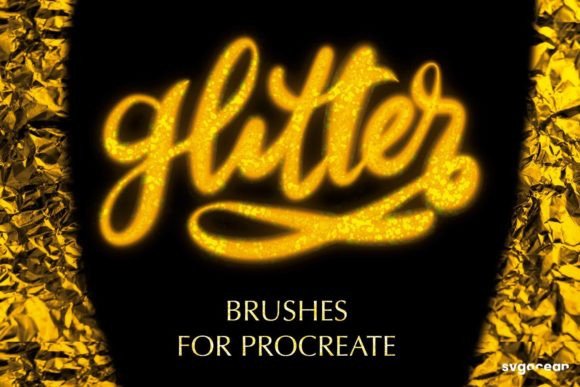
These brushes function as stamps within the Procreate ecosystem. This means they are not merely stroke-based tools that rely on pressure sensitivity for width; instead, they deposit clusters of glitter particles. The visual characteristic is one of organic randomness. Real glitter never falls in a perfect grid, and neither do these brushes. This inherent imperfection is what makes them feel authentic rather than digital and sterile.
The style is versatile. By adjusting the opacity, you can achieve anything from a subtle, dusty shimmer that sits quietly in the background to a bold, opaque explosion of light that demands attention. This flexibility allows them to complement various design styles, from the minimal elegance required in high-end packaging design to the vibrant, maximalist trends seen in contemporary editorial design.
Strategic Applications in Branding and Marketing
For entrepreneurs and marketers, visual hierarchy is everything. You have seconds to capture attention. Integrating glitter elements can serve as a powerful focal point. Consider the impact on brand perception. A beauty brand using soft, rose-gold glitter accents in their social media graphics communicates femininity and premium quality. A party planning business using bold, multi-colored sparkles conveys energy and fun.
These brushes are particularly effective in logo design when used sparingly. While a logo must remain legible at small sizes, adding a subtle glitter texture to specific elements—like a star icon or a decorative flourish—can create a memorable brand identity. It helps in recognition, setting your brand apart from competitors who rely solely on flat vector graphics.
In publishing and editorial design, these tools shine in cover art and chapter headers. Imagine a cookbook featuring a dessert recipe; a dusting of digital sugar or edible glitter over the title text creates an immediate sensory connection for the reader. It bridges the gap between the digital screen and the physical experience of taste and touch. Similarly, in web design, hero images enhanced with these textures can increase dwell time by adding visual interest that encourages exploration.
It is important to note that while these are creative fonts in spirit, they are actually brush assets. However, they interact beautifully with handwritten fonts and script fonts. Layering a glitter stamp over a elegant script typeface can create a composite effect that looks like hand-applied foil stamping, a technique traditionally expensive and difficult to achieve in print but effortless here.
Practical Guide to Installation and Usage
One of the greatest advantages of these Glitter Procreate Brushes is their ease of use. They are designed for the Procreate app on iPad, ensuring full compatibility with the Apple Pencil’s intuitive interface. Here is how you can integrate them into your workflow seamlessly.
First, understand the file format. You will receive a single .brushset file via instant download after purchase. This format is exclusive to Procreate, meaning it will not work in Photoshop, Illustrator, or other desktop software. This specialization ensures that the brushes are optimized for the touch interface and the specific rendering engine of the iPad app.
- Download the Assets: After your payment is confirmed, check your email for the download link. Save the
.brushsetfile to your iPad’s Files app or iCloud Drive for easy access. - Import into Procreate: Open the Procreate app. Tap on the Brush Library icon (the paintbrush symbol). At the very top of the brush list, tap the plus sign (+) or select "Import." Navigate to your downloaded file and tap it. The entire set will appear instantly in your library.
- Customize Your Sparkle: Select a brush from the new set. Before you start painting, adjust your settings. You can change the color to match your brand palette exactly. More importantly, play with the opacity slider. Lower opacity creates a dreamy, ethereal glow, while 100% opacity gives you hard, distinct glitter chunks.
Because these are stamps, you do not need to worry about complex brush engine settings like streamline or pressure curves for shape. You simply tap or drag to place the glitter. This makes them incredibly efficient for designers who need to produce high volumes of content, such as Instagram stories or Pinterest pins, where speed is essential.
Design Best Practices and Pairing Advice
While glitter is fun, it can easily become overwhelming if misused. To maintain professionalism and readability, follow these practical recommendations.
Contrast is Key: Glitter relies on light reflection to be visible. Always place your glitter elements against darker or contrasting backgrounds. White glitter on a white background will disappear. Deep navy, black, or rich jewel tones provide the perfect canvas for silver, gold, or rainbow glitter to pop.
Font Pairing Strategy: When combining these textures with text, ensure your typeface remains legible. A bold sans serif font or a strong serif font works best underneath or alongside glitter elements. Avoid pairing heavy glitter textures with thin, delicate handwritten fonts, as the visual noise of the glitter can obscure the letterforms, reducing readability.
Less is More: Use glitter as an accent, not a foundation. In corporate branding or serious editorial design, limit glitter to small details like bullet points, borders, or initial caps. In more playful contexts, such as children’s books or party invitations, you can be more liberal, but always maintain a clear visual hierarchy so the viewer knows where to look first.
Commercial Licensing: These brushes are suitable for both personal and commercial projects. Whether you are creating a client’s packaging design or selling your own digital prints, you can use these assets confidently. However, always review the specific license terms included with your download to ensure compliance with redistribution rules.
By integrating Glitter Procreate Brushes into your toolkit, you add a layer of sophistication and engagement to your digital art. They are not just a novelty; they are a strategic design asset that, when used with intention, can enhance brand identity, improve audience engagement, and bring a unique, tactile quality to your digital creations.