25 Photoshop Cloud Brushes for Realistic Digital Skies
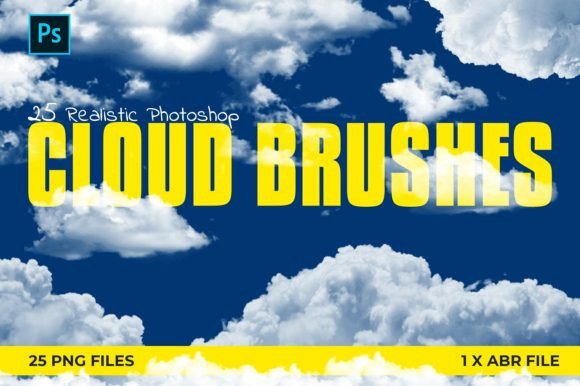
Digital artists and graphic designers know that the sky is often the most challenging element to render convincingly. A flat, uniform blue background can make even the most detailed foreground subject look pasted on and artificial. This is where a specialized toolkit like 25 Photoshop Cloud Brushes becomes an indispensable asset. These brushes are not just simple stamps; they are carefully crafted digital tools designed to mimic the organic, chaotic, and soft nature of real atmospheric conditions. By integrating these brushes into your workflow, you transform the tedious process of painting clouds from scratch into a dynamic, creative exploration.
The core value of this collection lies in its versatility and ease of use. You receive a single .ABR file that, when double-clicked, automatically loads all twenty-five unique cloud variations directly into your Photoshop Brushes Panel. Additionally, the inclusion of 25 PNG files offers flexibility for non-Photoshop users or those who prefer working with layered assets in other software. Whether you are compositing a surreal landscape, designing a movie poster, or enhancing a photograph, these tools provide the texture and depth necessary to ground your digital creations in reality.
Transforming Landscape Photography and Compositing
One of the most common applications for these brushes is in photo manipulation and landscape enhancement. Professional photographers often capture stunning foregrounds under less-than-ideal weather conditions. A brilliant sunset might be ruined by a hazy, featureless sky, or a dramatic mountain range might be obscured by overcast grayness. Instead of discarding the image, designers can use 25 Photoshop Cloud Brushes to replace or augment the existing sky.
Consider a scenario where you are creating a travel brochure. The original photo has a beautiful beach, but the sky is washed out. By layering soft, cumulus-style clouds from this brush set, you can introduce depth and visual interest. The key here is opacity control. Because these brushes are designed with natural transparency gradients, you can paint them at low opacity to blend seamlessly with the existing light sources. This avoids the "sticker effect" where digital elements look obviously superimposed. The PNG files included allow for even more precise control if you need to adjust color grading or perspective independently before merging them into your main composition.
Elevating Concept Art and Fantasy Illustrations
For concept artists and illustrators, the sky sets the mood. A stormy, turbulent sky suggests danger or conflict, while soft, wispy cirrus clouds evoke peace and tranquility. The variety within the 25 Photoshop Cloud Brushes pack allows artists to match the atmospheric tone to their narrative needs. When designing fantasy worlds, the rules of physics can be bent, but the visual language of clouds remains a crucial anchor for believability.
Imagine you are illustrating a floating island city. The underside of the island needs to interact with the clouds below it. Using the denser, fluffier brushes from this set, you can paint clouds that appear to wrap around the architecture, creating a sense of scale and altitude. The ability to quickly iterate is vital in concept art. Instead of spending hours rendering volumetric lighting from scratch, an artist can block in the major cloud shapes using these brushes, then refine the edges manually. This hybrid approach saves time without sacrificing artistic integrity. The brushes serve as a foundational layer, providing the complex textures that are difficult to achieve with standard hard-round brushes.
Graphic Design and Advertising Applications
In commercial graphic design, clouds are frequently used to convey feelings of freedom, cleanliness, or innovation. Tech companies often use cloud imagery to symbolize cloud computing, while eco-friendly brands use them to represent pure air and sustainability. The 25 Photoshop Cloud Brushes offer a clean, professional aesthetic that works well in these corporate contexts. Unlike stock photos, which can look generic or carry licensing restrictions, these brushes allow designers to create custom sky backgrounds tailored to specific brand colors and layouts.
For example, a social media campaign for a new airline might require a series of images featuring planes soaring through distinct cloud formations. By using the PNG files provided, a designer can quickly assemble multiple variations of sky backgrounds. They can adjust the hue to match the airline’s branding—perhaps adding a subtle orange tint for a sunrise theme or a cool blue for a night flight. The consistency across the 25 brushes ensures that all marketing materials maintain a cohesive visual identity, even if different designers are working on separate assets.
Practical Considerations for Best Results
While 25 Photoshop Cloud Brushes are powerful tools, achieving realistic results requires an understanding of how light and atmosphere work. Simply stamping a cloud onto a canvas rarely looks convincing. To get the most out of these brushes, consider the direction of your light source. If the sun is setting on the left, your clouds should be illuminated from the left, with shadows falling on the right. You may need to use the Dodge and Burn tools in Photoshop to enhance the three-dimensional form of the brush strokes.
Another critical factor is perspective. Clouds closer to the horizon should appear smaller and flatter, while those overhead can be larger and more detailed. When using these brushes, vary the size and rotation to avoid repetitive patterns. Nature is random; your digital sky should reflect that chaos. Rotate the brush tip dynamically as you paint to break up uniformity. Additionally, pay attention to color temperature. Clouds are rarely pure white. They reflect the colors of the sky and the sun, often taking on pink, purple, or golden hues during golden hour. Use clipping masks or adjustment layers to tint the clouds appropriately after painting them.
Strengths and Limitations
The primary strength of this collection is its efficiency. It bridges the gap between high-end 3D rendering and manual painting, offering a middle ground that is both fast and flexible. The inclusion of both ABR and PNG formats ensures compatibility across a wide range of workflows, making it accessible to beginners who might not yet be comfortable with brush settings and professionals who need quick assets for mockups.
However, users should be aware of potential limitations. Because these are 2D brushes, they lack true volumetric data. In extremely close-up shots or hyper-realistic renders, the edges of the brushes might appear too soft or lacking in fine detail compared to a ray-traced 3D cloud. In such cases, these brushes are best used as a base layer, supplemented with manual detailing or noise textures to add granularity. Furthermore, overusing any brush set can lead to a recognizable "style" that viewers might identify as digital art rather than photography. Mixing these clouds with other atmospheric elements like fog, haze, or rain can help mask the digital origin and create a more immersive environment.
Integration into Your Creative Workflow
Installing and using these resources is straightforward, minimizing technical friction. After downloading the package, you simply double-click the .ABR file. Photoshop will automatically import the brushes into your panel. From there, you can organize them into a dedicated group for easy access. For users working in Procreate, Affinity Photo, or Clip Studio Paint, the 25 PNG files can be imported as individual stamps or brushes, ensuring that the utility of this pack extends beyond the Adobe ecosystem.
Ultimately, 25 Photoshop Cloud Brushes are more than just a set of digital stamps; they are a catalyst for creativity. They remove the technical barrier of rendering complex atmospheric effects, allowing artists to focus on composition, storytelling, and mood. Whether you are retouching a portrait, designing a book cover, or creating a matte painting for a film, these tools provide the essential building blocks for believable skies. By mastering their application and combining them with sound artistic principles, you can elevate the quality of your digital projects and bring a new level of realism to your virtual worlds.