Evaluating Procreate Oil Painting Brushes for Digital Artists
The transition from traditional media to digital illustration often presents a significant hurdle for artists accustomed to the tactile resistance and blending properties of physical paint. For many, the sterility of standard digital brushes fails to replicate the organic unpredictability of oil on canvas. This is where specialized toolsets like Procreate Oil Painting Brushes become essential components of a modern digital workflow. Designed specifically for the iPad ecosystem, these assets aim to bridge the gap between classical technique and contemporary convenience. However, understanding their limitations and optimal use cases is critical before integrating them into your creative process.
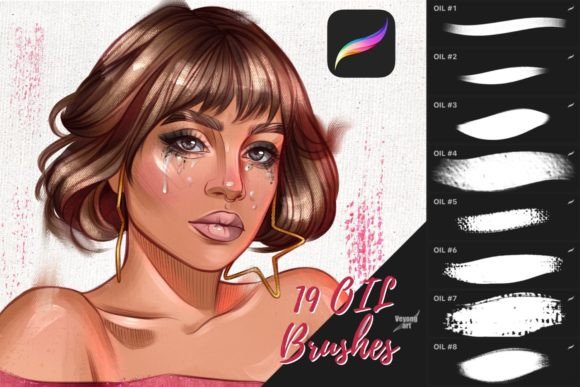
This analysis explores the functionality, quality, and practical application of a typical set of 19 oil brushes for Procreate. It is important to note from the outset that these are digital files intended exclusively for the Procreate application. They are not compatible with Photoshop, Clip Studio Paint, or other desktop-based software. Recognizing this constraint is the first step in determining whether this specific toolset aligns with your current hardware and software preferences.
The Mechanics of Digital Impasto
Oil painting is defined by its viscosity, slow drying time, and ability to blend seamlessly on the canvas. Replicating this digitally requires more than just a textured tip; it demands complex algorithms that simulate pressure sensitivity, tilt recognition, and color mixing. High-quality Procreate Oil Painting Brushes leverage the Apple Pencil’s advanced input capabilities to mimic these physical behaviors. When you press harder, the brush should lay down more pigment; when you tilt the stylus, it should flatten out like a bristle fan.
A well-curated set of 19 brushes typically covers the fundamental needs of an oil painter. This includes broad flats for blocking in shapes, rounds for detailing, filberts for soft edges, and specialty fans for texture. The value lies not in the quantity but in the distinct character of each brush. Unlike generic round brushes that merely change size, true oil simulations introduce subtle irregularities in the stroke edge, mimicking the way real bristles skip over the weave of a canvas. This "imperfection" is what adds life to digital art, preventing it from looking too polished or computer-generated.
Usability and Workflow Integration
For professionals and serious hobbyists, workflow efficiency is paramount. Installing and organizing these brushes within Procreate is generally straightforward, provided the user is familiar with importing .brushset files. Once installed, the immediate benefit is the reduction of setup time. Instead of spending hours tweaking opacity, flow, and grain settings to achieve a desired look, artists can select a pre-configured brush and begin painting immediately.
The usability of these tools extends beyond mere convenience. They offer consistency. In a commercial project where multiple illustrations must share a cohesive style, using a standardized set of Procreate Oil Painting Brushes ensures that the texture and stroke weight remain uniform across all pieces. This is particularly valuable for freelancers and small business owners who need to deliver branded content or book illustrations with a distinct visual identity. The reliability of the brush engine means that the artist can focus on composition and color theory rather than technical troubleshooting.
Performance in Real-World Scenarios
In practical application, these brushes perform best when used with a layered approach. Just as traditional oil painters work from thin washes to thick impasto, digital users should utilize the varying opacities built into these brushes. Many sets include "blender" brushes that do not add color but instead smear existing pixels, simulating the action of a clean, dry brush moving wet paint around. This feature is crucial for achieving realistic skin tones, atmospheric landscapes, and soft transitions.
However, performance is heavily dependent on the user’s hardware. Older iPad models may experience latency when using highly complex brushes with dense grain textures. Professionals working on tight deadlines should test these assets on their specific devices to ensure smooth stroke rendering. Furthermore, the effectiveness of the oil simulation relies on the artist’s technique. A heavy hand or incorrect angle can break the illusion, resulting in strokes that look muddy rather than blended. Mastery requires practice, much like learning to handle physical sable or hog hair brushes.
Who Benefits Most from These Tools?
The audience for Procreate Oil Painting Brushes is diverse, ranging from fine artists transitioning to digital platforms to graphic designers seeking a more organic aesthetic.
- Fine Artists and Illustrators: Those with a background in traditional media will appreciate the familiar behavior of these brushes. The learning curve is significantly lower compared to mastering vector tools or pixel-perfect ink brushes.
- Educators and Students: Art teachers can use these tools to demonstrate classical painting techniques without the mess, cost, or ventilation requirements of real oil paints. It provides a safe, reversible environment for experimentation.
- Content Creators and Bloggers: For those needing unique header images or social media graphics, oil-style art stands out in a feed dominated by flat vector designs. These brushes allow for the quick creation of high-impact, textured visuals.
- Concept Artists: While speed is often prioritized in concept art, the ability to quickly convey mood and lighting through painterly strokes is invaluable. These brushes facilitate rapid iteration during the early stages of design.
Conversely, these tools may not suit users who prefer crisp, clean lines or geometric precision. If your work involves technical diagrams, UI design, or comic book inking, standard engineering or ink brushes would be more appropriate. The nature of oil simulation is inherently loose and expressive, which can be a detriment if rigid control is required.
Limitations and Considerations
It is crucial to address the limitations explicitly. As stated, these Procreate Oil Painting Brushes are not suitable for other programs. If you work in a hybrid environment, switching between Procreate on the iPad and Photoshop on a desktop, you will need to find equivalent brushes for each platform. There is no universal file format that carries brush dynamics across different software ecosystems. This lack of portability can fragment a workflow if not managed carefully.
Additionally, while these brushes simulate the look of oil, they cannot fully replicate the physical depth of real impasto. On a flat screen, the illusion of thickness is created through highlights and shadows painted manually. Some advanced users may find this limiting if they are seeking true 3D texture. However, for most 2D applications, the visual fidelity provided by high-quality digital brushes is sufficient to fool the eye.
Another consideration is the file size and complexity. Highly detailed brushes can increase the file size of your artwork, potentially slowing down export times or causing issues when sharing large PSD or Procreate files with clients. It is advisable to flatten layers or simplify brush usage in final stages if file weight becomes a concern.
Long-Term Value and Professional Recommendation
When evaluating the long-term value of a digital asset pack, one must consider durability and relevance. Unlike physical paints that dry out or brushes that wear down, digital files remain pristine indefinitely. A one-time purchase of a robust set of 19 oil brushes offers infinite usage without recurring costs. This makes them a cost-effective investment for professionals building a sustainable toolkit.
The key to maximizing this value lies in customization. Procreate allows users to tweak any brush setting. An experienced artist might take a standard filbert from the set and adjust its grain source or pressure curve to better suit their personal style. This flexibility transforms a static product into a dynamic foundation for ongoing creative development.
For marketers and entrepreneurs, the ability to produce distinctive, hand-crafted visuals can enhance brand perception. In an era of AI-generated imagery and stock photos, authentic digital painting conveys a sense of human touch and craftsmanship. Using Procreate Oil Painting Brushes enables non-painters to approximate this aesthetic with a reasonable degree of success, adding perceived value to their content.
In conclusion, this specific collection of oil brushes serves a clear purpose: to provide a realistic, efficient, and expressive painting experience within the Procreate environment. They are not a magic solution for poor technique, nor are they compatible with external software. However, for iPad-based artists seeking to emulate the richness of traditional oils, they represent a powerful, professional-grade resource. By understanding their strengths and respecting their limitations, creators can integrate these tools seamlessly into their workflows, enhancing both the quality and efficiency of their digital art production.