Evaluating Snowflake Stamp Brushes for Procreate
The holiday season presents a unique set of challenges and opportunities for digital illustrators. Whether you are designing greeting cards, creating social media content, or working on complex seasonal illustrations, efficiency often becomes just as important as artistic flair. In this context, specialized tools like Snowflake Stamp Brushes for Procreate have gained attention among iPad artists. This article provides an objective evaluation of this specific digital asset, exploring its utility, limitations, and ideal use cases to help you determine if it aligns with your creative workflow.
Understanding the Product
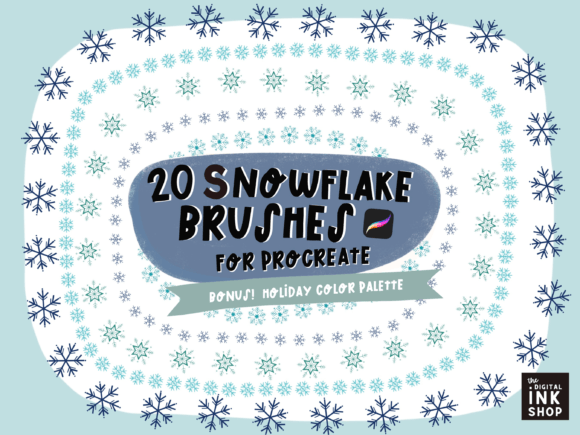
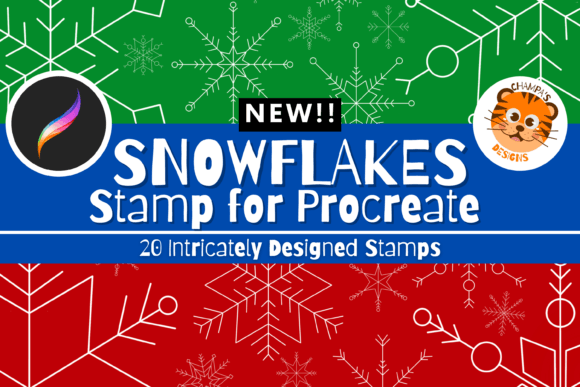
At its core, this product is a digital brush set designed exclusively for the Procreate application. It contains twenty distinct snowflake stamp brushes. Unlike standard painting brushes that simulate texture or pressure sensitivity for strokes, stamp brushes allow users to place pre-designed shapes onto the canvas with a single tap or stroke. These shapes vary in design, offering a range of geometric and organic snowflake patterns suitable for different artistic styles.
It is crucial to understand the technical nature of this purchase. This is a strictly digital file. Buyers do not receive any physical items. The value lies entirely in the time saved during the creation process and the consistency of the designs provided. The brushes are engineered to work within the Procreate ecosystem, leveraging the app’s specific brush engine to ensure smooth integration and responsiveness.
Why Consider Snowflake Stamps?
The primary reason artists seek out stamp brushes is efficiency. Drawing intricate snowflakes by hand can be time-consuming. Each snowflake requires symmetry, detailed line work, and consistent sizing. For a single illustration, this might be manageable. However, for projects requiring background elements, patterns, or multiple compositions, manually drawing each flake becomes a bottleneck.
Using Snowflake Stamp Brushes for Procreate allows artists to populate scenes quickly. This is particularly relevant for:
- Commercial Illustrations: Meeting tight deadlines for holiday-themed client work.
- Social Media Content: Creating engaging, seasonal posts where speed of production is key.
- Pattern Design: Generating repeating backgrounds for wrapping paper, textiles, or digital wallpapers.
- Cartoon and Children’s Book Art: Adding atmospheric details without distracting from the main characters.
Beyond speed, these brushes offer consistency. When creating a cohesive look across a series of images, having a standardized set of snowflake designs ensures visual harmony. This is difficult to achieve when drawing each element freehand, where natural variations in style and proportion can occur.
Technical Requirements and Compatibility
Before purchasing, it is essential to verify compatibility. This set is strictly for Procreate. It will not function in other drawing software such as Adobe Fresco, Clip Studio Paint, or Photoshop. Furthermore, because Procreate is exclusive to Apple’s iOS and iPadOS, you must have an compatible Apple device.
The specific requirements include:
- Procreate App: You must have the Procreate application installed on your device.
- Hardware: An iPad or iPhone capable of running the current version of Procreate. While an Apple Pencil is recommended for precision and control, it is not strictly required for using stamp brushes, as tapping the screen is the primary interaction method.
The installation process is straightforward but requires manual import. After downloading the digital file, users must locate the file on their device and select it within Procreate’s brush import menu. This is a one-time setup process, but users unfamiliar with importing custom brushes may need to consult Procreate’s support documentation.
Benefits and Tradeoffs
Like any digital tool, these brushes come with specific advantages and limitations. Understanding these tradeoffs is vital for making an informed decision.
Benefits
The most significant benefit is time savings. What might take thirty minutes to draw by hand can be achieved in seconds. This allows artists to focus more energy on composition, lighting, and character design rather than repetitive decorative elements. Additionally, the variety within the set—twenty different designs—provides enough diversity to avoid a repetitive, "copy-paste" appearance in final artworks. Artists can rotate, resize, and adjust the opacity of each stamp to create natural-looking snowfall.
Tradeoffs and Considerations
The primary limitation is software lock-in. If you switch to Android-based tablets or desktop-based software in the future, these brushes become unusable. This lack of portability is a common trait of platform-specific assets but should be considered if you maintain a multi-platform workflow.
Another consideration is artistic originality. Because these are pre-made assets, there is a risk that other artists may use the same stamps. For high-end, bespoke illustration work where uniqueness is paramount, relying heavily on stock stamps might dilute the personal touch of the artist. However, for most commercial and casual applications, this is rarely an issue, especially when the stamps are modified through color, size, and layering.
Ideal Use Cases
This tool is a strong fit for specific scenarios. If you are a freelance illustrator handling a high volume of holiday cards or marketing materials, the efficiency gain is tangible. Similarly, content creators who need to produce daily or weekly seasonal graphics will find the quick deployment of snowflake elements invaluable.
It is also suitable for beginners who struggle with drawing symmetrical geometric shapes. The stamps provide a professional-looking result without requiring advanced technical drawing skills. This can boost confidence and allow new users to create polished pieces while they continue to develop their fundamental drawing abilities.
When to Consider Alternatives
There are situations where alternative approaches may be more appropriate. If you are creating a fine art piece intended for gallery display or high-value print sales, the use of generic stamp brushes might be perceived as less authentic. In such cases, hand-drawing elements or creating custom brushes from your own sketches may be preferable.
Additionally, if you do not own an iPad or do not use Procreate, this product is not viable. Users of Adobe Illustrator or Photoshop might prefer vector-based snowflake libraries, which offer infinite scalability without pixelation. Vector assets are better suited for large-format printing, whereas Procreate brushes are raster-based and dependent on canvas resolution.
Making the Decision
To determine if Snowflake Stamp Brushes for Procreate are right for you, consider your current workflow and project needs. Ask yourself the following questions:
- Do I frequently create winter or holiday-themed artwork?
- Am I looking to reduce the time spent on repetitive decorative elements?
- Do I already use Procreate on an iPad or iPhone?
- Is my primary goal efficiency and consistency rather than 100% hand-drawn uniqueness?
If the answer to most of these questions is yes, this brush set offers a practical solution. It is a low-cost, low-risk investment that can significantly streamline the production of seasonal content. However, if you rarely draw snowflakes, or if you work primarily in vector software, the utility of this specific digital file will be limited.
In conclusion, the Snowflake Stamp Brushes for Procreate represent a specialized tool for a specific audience. They are not a replacement for fundamental drawing skills, but rather a productivity aid that enhances the digital illustrator’s toolkit. By understanding the compatibility requirements and weighing the benefits of speed against the desire for total originality, you can make an informed choice that supports your artistic goals this holiday season.