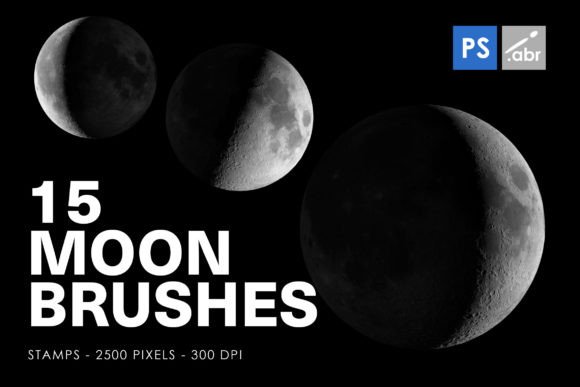
Evaluating the 15 Moon Photoshop Stamp Brushes for Digital Design
In the realm of digital art and photo manipulation, texture and atmospheric elements play a pivotal role in establishing mood and depth. Among the myriad tools available to designers, specialized brush sets offer a streamlined approach to incorporating complex visual motifs. The 15 Moon Photoshop Stamp Brushes represent a specific category of digital assets designed to integrate lunar imagery into creative projects efficiently. This collection includes fifteen distinct stamp brushes, optimized for compatibility across Adobe Photoshop versions CS2 through CC, with a resolution of 2500 pixels. Understanding the utility, limitations, and ideal applications of these brushes is essential for designers seeking to enhance their workflow without compromising artistic integrity.
Understanding the Asset Composition
At its core, this product is a set of pre-rendered digital stamps. Unlike standard round or textured brushes that rely on dynamic spacing and scattering to create patterns, stamp brushes apply a single, high-resolution image with each click or stroke. The MOON PHOTOSHOP STAMP BRUSHES FOR PHOTOSHOP CS2 - CC All versions are engineered to maintain clarity at substantial sizes, boasting a 2500-pixel dimension. This high resolution is critical for professional output, ensuring that the lunar surfaces retain their detailed cratering and shading even when scaled for large-format prints or high-definition screens.
The inclusion of fifteen variations allows for diversity in composition. Rather than relying on a single moon phase or angle, users can select from different illuminations and perspectives. This variety prevents repetitive patterns in larger designs and provides the flexibility to match the lighting direction of existing artwork. The compatibility range, spanning from the older CS2 to the current Creative Cloud iterations, ensures that freelancers and agencies working with legacy software are not excluded from utilizing these assets.
Practical Applications and Use Cases
The versatility of these brushes extends beyond simple celestial illustrations. Designers often seek efficient methods to introduce organic, high-contrast textures into their work. The 15 Moon Photoshop Stamp Brushes serve multiple functional roles depending on the project requirements.
- Digital Photo Manipulation: For composite images involving night skies or surreal landscapes, these brushes provide realistic lunar elements that can be blended using layer modes such as Screen or Lighten. This eliminates the need to source and mask individual stock photographs.
- Textural Overlays: The detailed surface of the moon can act as a unique texture map. When applied to typography or geometric shapes, it adds a gritty, organic feel that contrasts sharply with clean vector lines.
- Game Assets and Visual Effects: Independent game developers and VFX artists can use these high-resolution stamps as base layers for skyboxes or background parallax elements. The consistent lighting across the set helps maintain visual coherence in interactive environments.
- Decorative Elements: In print design, particularly for posters or book covers with mystical or scientific themes, these stamps serve as immediate focal points. They can be arranged in phases to illustrate time passage or orbital mechanics.
Benefits of Using Pre-Made Stamp Brushes
The primary advantage of utilizing the 15 Moon Photoshop Stamp Brushes is efficiency. Creating a photorealistic moon from scratch requires advanced knowledge of spherical mapping, lighting physics, and texture synthesis. Even for experienced artists, this process is time-consuming. By using pre-made stamps, designers can allocate more time to composition, color grading, and narrative development rather than technical rendering.
Furthermore, the standardized resolution of 2500 pixels offers a reliable baseline for quality. Inconsistent asset quality is a common issue when sourcing free resources from various online repositories. This curated set ensures that every brush in the collection meets a uniform standard, reducing the risk of pixelation or blurriness in final outputs. The ease of integration also lowers the barrier to entry for junior designers who may lack the skills to paint realistic celestial bodies manually.
Considerations and Tradeoffs
While convenient, reliance on stamp brushes introduces certain creative constraints. The most significant tradeoff is the potential for generic aesthetics. Because these are pre-defined images, they lack the unique imperfections and stylistic nuances that hand-painted elements might possess. If a project demands a highly stylized or abstract interpretation of the moon, these realistic stamps may require significant modification through filtering, warping, or painting over to align with the artistic vision.
Another consideration is file size and performance. High-resolution brushes consume more memory than standard vector-based or low-res raster brushes. Users working on systems with limited RAM or handling extremely large canvases may experience slight latency when loading or applying these stamps. Additionally, while the set includes fifteen variations, it may not cover every possible lunar phase or atmospheric condition. Designers requiring specific eclipses, blood moons, or heavily clouded views may find the selection limiting and need to supplement the set with other resources.
When to Choose This Tool Versus Alternatives
Deciding whether the 15 Moon Photoshop Stamp Brushes are the right fit depends largely on the project's scope and style. These brushes are a strong choice for:
- Rapid Prototyping: When quick mockups are needed for client presentations, the speed of stamp application is invaluable.
- Realistic Composites: Projects aiming for photorealism benefit from the accurate lighting and texture details inherent in the source images.
- Standardized Workflows: Teams that need consistent asset quality across multiple designers will appreciate the uniform resolution and format.
Conversely, alternatives may be worth considering in different scenarios. If the goal is to create a minimalist, vector-style illustration, using shape tools and gradients in Illustrator or Photoshop would yield cleaner, scalable results. For highly fantastical or painterly artworks, custom brush creation or manual painting allows for greater expressive control. Additionally, if the project requires animated lunar cycles, 3D modeling software or specialized animation plugins might offer more dynamic control than static 2D stamps.
Making an Informed Decision
Evaluating the MOON PHOTOSHOP STAMP BRUSHES FOR PHOTOSHOP CS2 - CC All versions requires balancing convenience against creative specificity. For designers who frequently incorporate celestial themes into their work, this set serves as a practical library component. It reduces repetitive tasks and ensures a baseline of technical quality. However, it should be viewed as a foundational tool rather than a complete solution. The most effective workflow often involves using these stamps as a base layer, then applying additional adjustments—such as color grading, noise addition, or manual detailing—to integrate them seamlessly into the unique context of each project.
Ultimately, the value of these brushes lies in their ability to streamline the technical aspects of digital design. By providing high-resolution, ready-to-use lunar imagery, they allow creators to focus on the broader narrative and compositional elements of their work. For those seeking to enhance their digital toolkit with reliable, versatile textures, this collection represents a sound investment, provided its limitations regarding stylistic uniqueness are acknowledged and managed through thoughtful post-processing.