Knitted Pattern Brushes for Procreate
Digital illustration has evolved far beyond simple sketches and flat colors. Today, texture plays a pivotal role in creating depth, warmth, and realism in artwork. For artists who want to infuse their designs with the cozy, tactile feel of handcrafted textiles, Knitted Pattern Brushes for Procreate offer an efficient and professional solution. This specialized toolset allows creators to simulate the intricate look of yarn, stitches, and woven fabrics without spending hours manually drawing every loop.
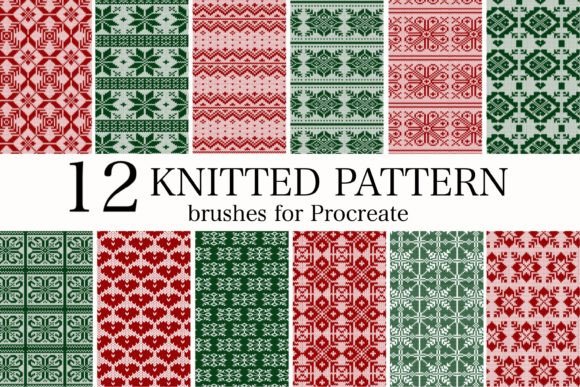
The set consists of 12 knitted pattern brushes for Procreate, carefully designed to cover a wide range of textile styles. Whether you are designing holiday cards, fashion concepts, or digital scrapbook pages, these brushes provide the authentic touch needed to make your illustrations stand out. However, to get the most out of this resource, it is important to understand how they work, where they fit best in your workflow, and what hardware is required for optimal performance.
Understanding the Value of Digital Textures
Texture is often what separates a good digital design from a great one. In traditional media, achieving a realistic knitted effect requires significant skill, patience, and time. You must understand the physics of yarn, the direction of light on fibers, and the complex interplay of shadows within stitches. Replicating this manually on a tablet can be tedious and prone to inconsistency.
This is where Knitted Pattern Brushes for Procreate bridge the gap between artistic vision and technical execution. These brushes are pre-configured with specific grain, spacing, and pressure sensitivity settings that mimic the behavior of real knitting needles and yarn. By using them, you can apply complex textures with a single stroke. This efficiency does not mean sacrificing quality; rather, it frees up your creative energy to focus on composition, color theory, and overall design aesthetics.
For beginners, these tools lower the barrier to entry for textile illustration. You do not need to be an expert in fabric rendering to create convincing sweaters, scarves, or blankets. For professionals, they serve as a time-saving asset that speeds up client projects without compromising on the high-end look expected in commercial work.
Essential Hardware Requirements
Before diving into creation, it is crucial to address the technical requirements. To use this brush set effectively, you should have an iPad Pro with Apple Pencil. While Procreate is compatible with various iPad models and styluses, the Apple Pencil offers the precision, pressure sensitivity, and tilt recognition necessary to control the nuance of these textured brushes.
The iPad Pro’s powerful processor ensures that layers with heavy texture brushes remain responsive, preventing lag during detailed work. The Apple Pencil allows you to vary the thickness and opacity of the knit strokes naturally, just as you would vary pressure when drawing with a physical pencil or pen. Using inferior hardware may result in a less intuitive experience, where the brushes feel rigid or unresponsive to your hand movements.
Practical Applications and Use Cases
The versatility of this 12-brush set makes it suitable for a wide array of creative projects. Here are some practical ways to integrate these tools into your workflow:
- Holiday Card Decoration: Nothing says "winter" like the visual warmth of wool. Use these brushes to add knitted borders, snowman scarves, or cozy mitten details to your Christmas invitations and greeting cards. The texture adds a tangible feel to digital prints, making them more appealing to recipients.
- Fashion Illustration: Designers often need to communicate fabric choices quickly. Instead of writing notes, you can visually demonstrate the weight and weave of a garment. Use the brushes to sketch cable-knit sweaters, ribbed cuffs, or chunky beanies directly onto your fashion croquis. This helps clients visualize the final product more accurately.
- Scrapbooking Paper and Backgrounds: Digital scrapbooking relies heavily on layered textures. Create custom background papers that look like knitted fabric to add depth to your layouts. These backgrounds pair beautifully with photos of family gatherings, winter vacations, or baby announcements.
- Character Design: Adding clothing texture brings characters to life. A hero wearing a rugged, knitted tunic feels more grounded and realistic than one wearing flat-colored clothing. These brushes allow you to define the material of your character’s attire instantly.
How to Get Started
Getting started with Knitted Pattern Brushes for Procreate is straightforward. Once you purchase and download the file, installation is simple. Open the .brushset file on your iPad, and Procreate will automatically import the tools into your brush library. You will find the 12 distinct brushes ready for immediate use.
To begin, create a new layer above your base sketch or color block. Select the brush that best matches the type of knit you wish to emulate—some may mimic fine gauge jersey knits, while others resemble chunky cable patterns. Adjust the size of the brush using the slider to fit the scale of your illustration. Remember that lighting plays a key role in realism; consider adding a separate layer for highlights and shadows to enhance the three-dimensional effect of the stitches.
Tips for Realistic Results
- Vary Your Strokes: Avoid repetitive, mechanical patterns. Change the direction and length of your strokes to mimic the natural irregularities of hand-knitting.
- Use Clipping Masks: Apply the texture on a new layer and clip it to your base color layer. This ensures the knit pattern stays within the lines of your garment or object, making editing much easier.
- Experiment with Opacity: Lowering the opacity of the brush layer can create a subtler, more integrated look, especially for fine knits that do not dominate the visual field.
- Combine Brushes: Do not hesitate to mix different brushes from the set. A sweater might have a ribbed collar (using one brush) and a cable-knit body (using another). Layering these creates a more complex and authentic garment.
Important Considerations for Users
While these brushes are powerful, they are tools, not magic wands. Understanding their limitations and best practices will help you achieve better results. First, consider the resolution of your canvas. High-detail textures require a sufficiently large canvas size to avoid pixelation when zoomed in or printed. If you are designing for print, such as Christmas invitations, ensure your document is set to at least 300 DPI.
Second, think about color. Knitted fabrics interact with light differently than smooth surfaces. A single flat color will look unnatural. Use the brushes in conjunction with Procreate’s blending modes and adjustment layers to introduce color variation, mimicking the way dye settles into yarn fibers.
Finally, remember that context matters. A heavy cable knit might look overwhelming on a small icon but perfect on a large poster. Always step back and view your work at different scales to ensure the texture enhances rather than distracts from the overall design.
In conclusion, Knitted Pattern Brushes for Procreate are an invaluable addition to any digital artist’s toolkit. They simplify the complex task of textile rendering, allowing you to produce professional-quality illustrations with ease. Whether you are a hobbyist looking to add charm to your holiday cards or a professional designer streamlining your fashion sketches, this set of 12 brushes provides the versatility and quality needed to elevate your work. With the right hardware and a bit of practice, you can transform flat digital drawings into rich, textured artworks that resonate with warmth and creativity.