Mastering Chalk Art Brushes for Digital Design
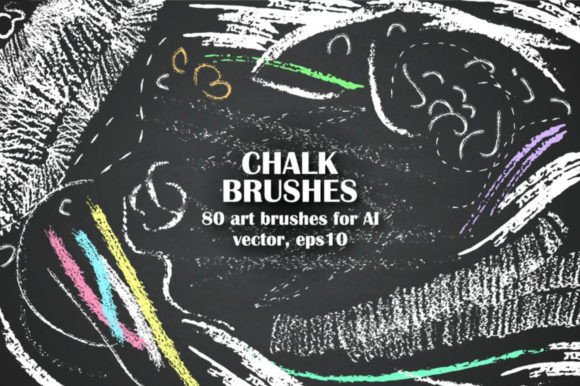
Digital design often suffers from a sterile, overly polished aesthetic. In an era where authenticity and human touch are highly valued by audiences, Chalk Art Brushes offer a vital bridge between the tactile warmth of traditional media and the precision of vector graphics. This handy set of 80 chalk brushes allows designers, educators, and creators to write, draw, and decorate with messy, organic textures that feel genuinely handcrafted. Whether you are designing a classroom worksheet, branding a boutique coffee shop, or creating social media content, these tools provide the flexibility to adjust size and color while maintaining the rough, authentic look of real chalk on a board.
Why Texture Matters in Modern Vector Design
For many years, vector art was synonymous with clean lines and flat colors. While efficient, this style can sometimes lack emotional resonance. Chalk art brushes vector sets change this dynamic by introducing imperfection. The human eye is naturally drawn to texture because it implies effort and humanity. When you apply a chalk brush to a path in Adobe Illustrator, you are not just changing a stroke; you are adding character.
This set includes thin and fine brushes for detailed lettering, as well as rough textures for broader strokes and shading. The ability to create messy textures without losing the scalability of vector files is a significant advantage. Unlike raster images, which pixelate when enlarged, these EPS10 and AI files remain crisp at any size. This makes them ideal for everything from small Instagram posts to large-format print signage.
Tailored Applications for Different Creators
The value of a digital asset depends heavily on the user’s specific goals. Here is how different audiences can leverage this toolkit effectively.
Educators and Instructional Designers
Teachers and online course creators often need materials that feel approachable and informal. A rigid, corporate-style font can create psychological distance between the educator and the student. By using chalkboards in black and green included in this set, educators can recreate the familiar classroom environment digitally. You can use the premade chalk arrow set to guide attention to key concepts in a presentation or the chalk decorative frame set to highlight important definitions. The ease of use means that even those with limited graphic design skills can produce professional-looking educational resources quickly.
Small Business Owners and Marketers
For entrepreneurs, particularly those in the food, beverage, or lifestyle sectors, branding is about atmosphere. A bakery or a craft brewery might want a menu or promotional flyer that evokes a rustic, artisanal feel. Using Chalk Art Brushes allows marketers to create custom typography that aligns with this aesthetic without hiring a calligrapher. The chalk wreaths included in the package are perfect for seasonal promotions, such as holiday sales or spring launches. Because the brushes are adjustable, you can match the brand’s specific color palette instantly, ensuring consistency across all marketing channels.
Professional Graphic Designers
Experienced designers value efficiency and versatility. While they could create custom chalk textures from scratch, it is time-consuming. This set of 80 brushes serves as a robust foundation that accelerates the workflow. Professionals can use the fine brushes for intricate logo details or the rougher textures for background elements in poster design. The fact that these are vector-based means they can be integrated into complex compositions without worrying about resolution issues. Furthermore, the inclusion of premade design elements like frames and arrows provides quick building blocks for mockups and client presentations.
Hobbyists and Digital Journalers
Not everyone uses these tools for commercial gain. Hobbyists who enjoy digital planning, scrapbooking, or personal art projects find immense joy in the creative freedom these brushes offer. The ability to "play" with size and opacity allows for experimentation without the mess of physical chalk dust. For beginners, the low barrier to entry is appealing. You do not need to master complex pressure-sensitive tablet settings to get a good result; simply applying the brush to a path yields immediate, satisfying results.
Technical Features and Usability
Understanding the technical specifications helps users determine if this tool fits their workflow. This collection requires Adobe Illustrator, a standard industry software. The files are provided in EPS10 and AI formats, ensuring compatibility with most modern versions of the software. A JPG preview is also included, allowing you to browse the styles before opening the heavy vector files.
The core strength of this set lies in its adaptability. Each brush can be applied to any path created with the Pen Tool, Pencil Tool, or Shape Tools. Once a path is selected, choosing a brush from the panel instantly transforms the line. Users can then adjust the stroke weight to make the chalk mark thicker or thinner, and change the color to suit their design needs. This non-destructive editing process is crucial for iterative design, allowing for rapid changes without starting over.
How to Install and Use the Brushes
Getting started with Chalk Art Brushes is straightforward, but knowing the correct steps ensures a smooth experience. Follow this practical guide to integrate the set into your library.
- Open the File: Launch Adobe Illustrator and open the provided AI or EPS file. You will see various samples on the artboard; these are for preview purposes only.
- Access the Brush Panel: Navigate to the top menu and select Window > Brushes. This opens the Brushes panel where all 80 chalk styles are listed.
- Apply a Brush: Create a new path using any drawing tool. With the path selected, click on a brush in the panel. The path will immediately adopt the chalk texture.
- Customize: Adjust the stroke weight and color in the Properties or Control panel to refine the look. Experiment with different brushes to find the right level of "messiness" for your project.
- Save to Library: To use these brushes in future projects without reopening the original file, you must save them to your library. First, save the EPS file as an AI file. Then, go to the Brushes panel menu and select Save Brush Library. This installs the set permanently, making it available in any new document you create.
Evaluating Quality and Long-Term Value
When investing in digital assets, consider the long-term usefulness. A set of 80 brushes offers significant variety, reducing the likelihood of repetitive designs. The inclusion of premade elements like chalkboards and wreaths adds extra value, saving hours of construction time. For professionals, this translates to higher billable efficiency. For hobbyists, it means more time creating and less time troubleshooting.
Moreover, the vector nature of these brushes ensures they are future-proof. As display technologies improve and print requirements change, vector graphics remain relevant. Unlike a PNG image of chalk text that might look blurry on a high-resolution screen, these brushes scale infinitely. This reliability makes them a smart addition to any designer’s toolkit.
Making the Right Choice for Your Projects
Before purchasing or downloading, assess your current needs. If your work primarily involves corporate reports or technical diagrams, these brushes may see limited use. However, if your projects involve storytelling, education, lifestyle branding, or any context where a human touch is beneficial, Chalk Art Brushes are an excellent resource. They empower users to break away from the rigidity of standard digital fonts and embrace a more expressive, organic visual language. By understanding how to install, customize, and apply these tools, you can elevate the quality of your designs and connect more deeply with your audience.