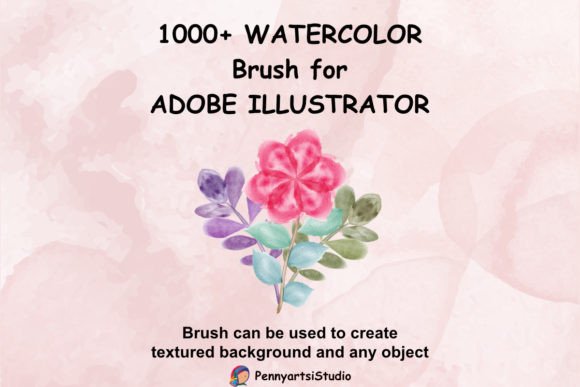
Mastering Watercolor Brushes for Digital Design
The tactile warmth of hand-painted art has always held a distinct place in visual communication. It conveys authenticity, emotion, and a human touch that sterile digital lines often struggle to replicate. For modern designers, the challenge has long been bridging the gap between traditional media and digital efficiency. This is where high-quality watercolor brushes become an indispensable asset. By integrating these tools into your workflow, you unlock the ability to produce organic, textured visuals without the mess, drying time, or material costs associated with physical painting.
This specific collection offers a robust solution for creators seeking versatility. With 1000 unique vector watercolor brushes, compatible with Adobe Illustrator CC and above on both PC and Mac, designers gain access to a vast library of resources created from real hand-painted sources. These are not merely digital imitations; they are authentic captures of watercolor behavior, translated into scalable vector formats. This ensures that whether you are designing a small social media icon or a large-format banner, the integrity of the brushstroke remains crisp and clear.
The Power of Vector Watercolor in Modern Workflows
Traditional raster-based watercolor brushes can lose quality when scaled up, leading to pixelation and blurred edges. The distinct advantage of using vector watercolor brushes lies in their mathematical precision. Because these brushes are built on vector paths, they remain infinitely scalable. You can stretch a delicate wash across a billboard or shrink a detailed splatter for a business card, and the edges will remain sharp. This flexibility is crucial for professional designers who need to adapt assets across multiple platforms and sizes without recreating artwork from scratch.
Furthermore, the fact that these 1000 brushes were created from real hand-painted watercolor means they retain the natural irregularities that make the medium so appealing. Watercolor is defined by its unpredictability—the way pigment pools, the soft bleed of water into paper, and the granular texture of dried paint. Digital tools often sanitize these features, resulting in art that looks too perfect and therefore artificial. This pack preserves those organic nuances, allowing you to maintain the soul of traditional art while leveraging the speed and editability of digital software.
Creative Applications Across Industries
The utility of such a comprehensive brush pack extends far beyond simple illustration. Different professionals can leverage these tools to enhance their specific projects, adding depth and character to otherwise flat designs.
Branding and Identity Design
For brand designers, especially those working with lifestyle, wellness, or artisanal clients, watercolor elements provide an immediate sense of approachability and elegance. You can use these brushes to create custom logos that feel handcrafted and unique. A subtle watercolor wash behind a serif typeface can soften a corporate identity, making it feel more welcoming. Additionally, these brushes are excellent for creating patterned backgrounds for packaging design. By layering different strokes from the 1000-brush library, you can generate seamless, non-repeating textures that add premium value to product boxes, labels, and wrappers.
Digital Marketing and Social Media
In the fast-paced world of digital marketing, standing out in a feed dominated by polished photography and rigid graphics is essential. Watercolor backgrounds offer a refreshing contrast. Marketers and content creators can use these brushes to frame quotes, highlight key statistics, or create eye-catching headers for blog posts. The organic shapes draw the eye naturally, guiding viewers through the content. Because the brushes are compatible with Adobe Illustrator, you can easily adjust colors to match brand guidelines, ensuring consistency across all marketing materials while maintaining a creative, artistic flair.
Educational Materials and Publishing
Educators and publishers often seek ways to make learning materials more engaging. Textbooks, worksheets, and e-books benefit greatly from the gentle, non-distracting nature of watercolor illustrations. You can use these brushes to create diagrams, maps, or decorative borders that break up dense text. For children’s books or educational apps, the softness of watercolor is particularly effective in creating a safe, imaginative atmosphere. The variety within the 1000-brush pack allows for the creation of diverse characters and environments, keeping young readers engaged without overwhelming them with harsh lines or bright, neon colors.
Techniques for Effective Implementation
Having access to 1000 brushes is powerful, but using them effectively requires a strategic approach. To avoid cluttered or chaotic designs, consider the following practical recommendations.
- Layering for Depth: Do not rely on a single brush stroke. Build complexity by layering multiple brushes with varying opacity levels. Start with a light wash as a base, then add darker, more defined strokes on top to create dimension.
- Color Harmony: While the brushes come with pre-set colors, the true power lies in recoloring them. Use Adobe Illustrator’s color guide or global swatches to ensure all watercolor elements adhere to a cohesive palette. This prevents the design from looking disjointed.
- Balance with Typography: Watercolor textures are busy. When pairing them with text, ensure there is sufficient contrast. Use solid blocks of color or white space to separate the text from the textured background, ensuring readability remains paramount.
- Mixing Media: Combine these watercolor brushes with clean, geometric shapes or modern sans-serif fonts. This juxtaposition of organic and structured elements creates a contemporary aesthetic that feels both artistic and professional.
Customization and Originality
One of the greatest risks in using preset assets is the potential for generic-looking results. To keep your work original, it is essential to customize the brushes. Since these are vector files, you can manipulate individual anchor points, adjust stroke widths, and modify blending modes. Experiment with the transparency settings to mimic the effect of wet-on-wet or dry-brush techniques. By altering the default properties, you transform a standard asset into a bespoke element tailored to your specific project needs.
Moreover, consider the context of your audience. A corporate annual report may require subtle, muted watercolor accents, while a music festival poster might demand bold, vibrant splashes. Understanding the emotional resonance of color and texture allows you to select the right brush from the 1000 available options to convey the intended message. This thoughtful selection process elevates your design from mere decoration to meaningful communication.
Streamlining Your Design Process
Efficiency is key for freelancers and small business owners. Having a centralized library of 1000 high-quality brushes saves countless hours that would otherwise be spent scanning traditional paintings or searching for disparate online resources. Organize your favorite brushes into sub-libraries within Illustrator based on style—such as "splatters," "washes," or "details"—to speed up your workflow. This organization ensures that when inspiration strikes, you can quickly access the tools you need without disrupting your creative flow.
Additionally, because these brushes are compatible with both PC and Mac, teams can collaborate seamlessly regardless of their hardware preferences. Files shared between team members will render consistently, avoiding compatibility issues that often plague cross-platform projects. This reliability is crucial for agencies and collaborative groups who need to maintain high standards of quality and consistency across all deliverables.
In conclusion, integrating these watercolor brushes into your design toolkit offers a blend of artistic authenticity and digital practicality. Whether you are crafting a brand identity, designing educational content, or creating social media assets, these vectors provide the flexibility and quality needed to produce standout work. By understanding how to layer, customize, and contextualize these elements, you can elevate your designs, adding a human touch that resonates with audiences in an increasingly digital world.