Mastering Texture: A Practical Guide to Seamless Halftone Brushes for Procreate
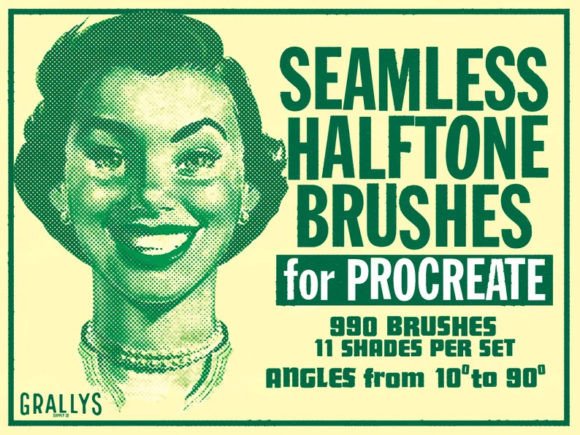
In the evolving landscape of digital illustration, texture serves as the bridge between sterile pixels and organic expression. For artists working within the iPad ecosystem, achieving authentic print-inspired effects without resorting to complex layer masks or external photo editing software has long been a workflow bottleneck. This is where specialized tools like Seamless Halftone Brushes for Procreate become essential assets rather than mere novelties. These brushes are designed to replicate the classic halftone dot patterns found in vintage comics, newspapers, and pop art, offering a streamlined method to add depth, shading, and stylistic flair to digital artworks.
The primary appeal of these brushes lies in their versatility and ease of integration. Unlike static stamps that require manual rotation or alignment to avoid visible repetition, seamless brushes allow for continuous painting. This means an artist can fill large areas with consistent texture while maintaining the natural flow of their hand movement. The ability to use these tools in any colour or opacity further enhances their utility, allowing for subtle background textures or bold, high-contrast graphic elements depending on the project’s needs.
Understanding the Mechanics of Digital Halftones
Halftoning is a reprographic technique that simulates continuous tone imagery through the use of dots, varying either in size or in spacing. In traditional printing, this was a physical necessity. In digital art, it is an aesthetic choice that evokes nostalgia, adds visual interest, or creates a specific mid-century modern vibe. However, creating these patterns manually in Procreate is time-consuming and often results in uneven distribution.
Seamless Halftone Brushes for Procreate automate this process by embedding the pattern logic directly into the brush engine. When you stroke across the canvas, the brush generates a uniform grid of dots that aligns perfectly with previous strokes. This seamlessness is critical for professional-grade work. If a brush leaves visible lines where strokes overlap, the illusion of a printed texture is broken, requiring additional cleanup work. By eliminating these artifacts, these brushes ensure that the final output looks cohesive and intentional, regardless of how many layers of texture are applied.
Flexibility and Customization in Workflow
One of the most significant advantages of this toolset is its adaptability. Digital art is rarely one-size-fits-all, and rigid tools often hinder creativity. These brushes are designed to be resized to best fit your art, meaning you can switch from fine, detailed shading on a character’s face to broad, atmospheric backgrounds in seconds. This scalability ensures that the dot pattern remains crisp and relevant to the scale of the illustration.
Furthermore, the ability to adjust opacity allows for nuanced control over the intensity of the effect. A low-opacity pass can create a subtle grain that mimics aged paper, while a full-opacity application delivers the stark, high-impact look of comic book ink. This dynamic range makes the brushes suitable for various styles, from soft editorial illustrations to hard-edged graphic design projects. Professionals appreciate this flexibility because it reduces the need to switch between multiple different brush sets, keeping the workspace clean and the creative momentum uninterrupted.
Licensing and Commercial Viability
For freelancers, small business owners, and commercial artists, understanding licensing terms is as important as the quality of the tool itself. The usage rights associated with Seamless Halftone Brushes for Procreate are structured to support professional workflows. Users are welcome to incorporate these brushes into both personal and commercial artworks. This means that illustrations created for client campaigns, book covers, merchandise, or digital products can legally utilize these textures without additional royalty fees or attribution requirements.
However, there is a clear distinction between using the tool and distributing the tool. The license explicitly states that users must not resell the brushes or give them away as a freebie. This restriction protects the intellectual property of the creator and ensures that the value of the asset is maintained. For ethical creators, this is a standard and reasonable expectation. It allows artists to monetize their own creations freely while respecting the original developer’s rights. This clarity in licensing removes legal ambiguity, making the brushes a safe investment for agencies and independent contractors alike.
Installation and Technical Integration
The user experience begins with the installation process, which is designed to be frictionless. Once you have downloaded your brush file, the integration into Procreate is straightforward. Users simply need to go to their Files app on the iPad and click on the downloaded file. The system should automatically import the brush set directly into Procreate, placing it at the top of your brush folders for immediate access.
This automatic import feature is a significant quality-of-life improvement. Many third-party brush sets require manual importing through Procreate’s settings menu, which can be cumbersome when managing large libraries. By leveraging the native file handling capabilities of iOS, these brushes reduce setup time to mere seconds. If any issues arise during this process, the developer offers direct support, encouraging users to contact them if they encounter download problems. This level of post-purchase support indicates a commitment to customer satisfaction and reliability, which is often lacking in the crowded marketplace of digital assets.
Real-World Applications and Audience Fit
Who benefits most from Seamless Halftone Brushes for Procreate? The answer spans a wide demographic of creative professionals. Graphic designers working on retro-themed branding can use these brushes to add authentic texture to logos and packaging. Illustrators creating comic strips or graphic novels can speed up their shading process significantly, maintaining consistency across panels. Even marketers and social media content creators can elevate their visual posts by adding a distinctive, tactile feel to otherwise flat digital graphics.
Educators and bloggers may also find value in these tools for creating engaging visual aids that stand out from standard stock photography. The ability to quickly generate stylized backgrounds or accents allows for faster content production without sacrificing aesthetic quality. For serious hobbyists, these brushes offer a gateway to exploring new artistic styles without the steep learning curve associated with manual texture creation.
Evaluating Long-Term Value
When assessing the long-term value of any digital asset, consistency and reliability are paramount. A brush set that works well initially but produces erratic results after updates or OS changes is a liability. Seamless Halftone Brushes for Procreate are built on stable brush engines that are less prone to breaking with software updates. Their simplicity is their strength; by focusing on doing one thing exceptionally well—creating seamless halftone patterns—they avoid the bloat and complexity that often plague larger, all-in-one brush packs.
The practical value extends to file size and performance as well. Because these brushes rely on efficient pattern generation rather than massive image stamps, they do not bog down the Procreate interface. This ensures smooth performance even on older iPad models, making them accessible to a broader range of users. For professionals who rely on their devices for daily income, this reliability translates directly to productivity.
In conclusion, these brushes represent a focused, high-utility addition to any digital artist’s toolkit. They solve a specific problem—efficient, authentic halftone texturing—with elegance and ease. By combining seamless functionality, flexible customization, and clear commercial licensing, they meet the rigorous demands of modern creative workflows. Whether you are refining a client project or experimenting with personal art, these tools provide the precision and style needed to elevate your digital output.