Mastering Water Effects with Procreate Brushes
Digital illustration has evolved rapidly, moving far beyond simple line art and flat colors. Today, creators demand tools that mimic the organic unpredictability of traditional media while retaining the flexibility of digital workflows. This is where specialized toolsets like Procreate Water Brushes X 16 become indispensable. For artists, designers, and entrepreneurs looking to add depth, fluidity, and atmospheric quality to their work, this specific brush pack offers a streamlined solution to one of the most challenging aspects of digital painting: water.
Water is notoriously difficult to render. It reflects, refracts, moves, and changes transparency based on its environment. Trying to paint realistic waves, bubbles, or light refractions from scratch can be time-consuming and technically demanding. These sixteen custom brushes are designed to bypass the steep learning curve, allowing you to focus on composition and creativity rather than fighting with software settings. Whether you are creating a quick sketch for a client or designing a complex piece for print-on-demand products, understanding how to leverage these tools can significantly enhance your output quality and efficiency.
What Makes This Brush Pack Unique
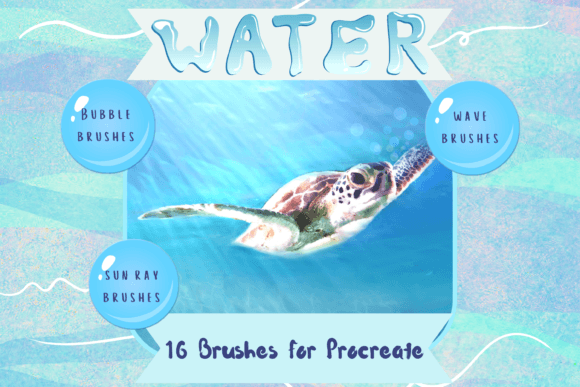
The core value of Procreate Water Brushes X 16 lies in its versatility. It is not just a collection of static stamps; it is a functional toolkit that integrates seamlessly into the Procreate ecosystem. The pack includes a diverse range of utilities, from dynamic wave brushes that function as both paint and blending tools, to precise bubble stamps and ethereal light rays. This variety ensures that you can handle every stage of a watery scene, from the initial underpainting to the final highlights.
One of the standout features is the dual functionality of the wave brushes. In traditional digital painting, artists often switch between multiple layers and blending modes to achieve a soft, fluid look. With these brushes, the texture and opacity are pre-configured to interact naturally with your existing canvas layers. You can use them to lay down base shapes or to blend harsh edges, creating a seamless transition between elements. This reduces the number of steps required to achieve a professional finish, which is crucial for freelancers working against tight deadlines.
Additionally, the inclusion of light ray overlays addresses a common pain point in digital art: lighting. Water interacts with light in complex ways, creating caustics and shimmering effects that are hard to replicate manually. These brushes allow you to overlay realistic light patterns instantly, adding a sense of depth and realism that elevates the overall aesthetic of your artwork. The bubble stamps provide another layer of detail, perfect for adding texture to underwater scenes or carbonated beverages in product illustrations.
Practical Applications for Creators and Businesses
The utility of these digital assets extends far beyond personal hobby projects. For professionals and business owners, Procreate Water Brushes X 16 opens up new avenues for product creation and brand differentiation. Because the resulting artwork is high-resolution and versatile, it can be adapted for a wide range of commercial applications.
- Greeting Cards and Invitations: Watercolor aesthetics are perennially popular in the stationery market. Using these brushes, you can create bespoke designs for weddings, birthdays, and holidays that feel hand-painted but are easily scalable and reproducible.
- Print on Demand (POD): Entrepreneurs selling on platforms like Etsy, Redbubble, or Society6 can use these elements to design unique wrapping paper, wall art, and textiles. The organic nature of water textures appeals to consumers looking for artisanal vibes in mass-produced goods.
- Scrapbooking and Digital Planning: The clip art elements generated with these brushes can be exported as PNGs with transparent backgrounds. This makes them ideal for digital scrapbookers and planners who need decorative elements that integrate cleanly with photos and text.
- Brand Identity and Marketing: Marketers can use water-themed graphics to convey concepts of purity, freshness, or calmness. This is particularly effective for brands in the wellness, beauty, and beverage industries.
For educators and bloggers, these brushes offer a way to create engaging visual content without needing advanced illustration skills. A simple background created with the wave and light brushes can transform a standard blog header or social media post into something visually striking, increasing engagement and click-through rates.
Technical Requirements and Setup
Before purchasing or downloading Procreate Water Brushes X 16, it is essential to understand the technical ecosystem required to use them. These are not standalone image files; they are proprietary brush files designed exclusively for the Procreate app. Therefore, you must have an iPad with Procreate installed. Furthermore, to fully utilize the pressure sensitivity and tilt features that make these brushes feel natural, an Apple Pencil is highly recommended. While finger painting is possible, it limits the precision and expressive potential of the toolset.
The installation process requires a few additional steps compared to standard app downloads. Since the brushes come in a compressed format, you will need a method to unzip the files directly on your iPad. Many users find cloud storage services like iCloud Drive or Dropbox convenient for this purpose. Once the file is downloaded, you may need a third-party app like iZip to extract the contents if your default file manager does not handle the specific archive type automatically.
After unzipping, the import process is straightforward. You simply tap the brush library in Procreate, select "Import," and choose the extracted brush file. The pack will appear in a named folder within your brush library, keeping your workspace organized. It is worth noting that these files will not work on Android tablets, Windows PCs, or Mac computers unless you are using an iPad emulator, which is generally not recommended for serious creative work due to latency issues.
Maximizing Your Workflow
To get the most out of Procreate Water Brushes X 16, consider experimenting with layer blending modes. While the brushes are designed to look good on default settings, combining them with modes like "Multiply" for shadows or "Screen" for highlights can create more dynamic results. Additionally, because these are digital tools, you have the freedom to undo, adjust opacity, and resize elements without any waste. This encourages experimentation and risk-taking, which is often where the most innovative designs emerge.
For those new to digital watercolor techniques, start by practicing the wave brushes on a blank canvas. Observe how the pressure sensitivity affects the stroke width and opacity. Once comfortable, try integrating the bubble stamps and light rays into a simple composition. Gradually build complexity as you understand how each element interacts with the others. Remember, the goal is not to rely solely on the brushes but to use them as a foundation upon which you build your unique artistic voice.
In conclusion, Procreate Water Brushes X 16 represents a valuable investment for anyone serious about digital illustration involving fluid elements. By reducing technical barriers and providing high-quality, ready-to-use textures, this pack empowers creators to produce professional-grade artwork efficiently. Whether you are designing for commercial print, creating digital assets for social media, or simply exploring your creative hobbies, these tools offer the flexibility and quality needed to bring your vision to life.