Mastering Winter Art with Snowflake Procreate Brushes
The arrival of winter brings a distinct shift in the visual landscape, characterized by crisp air, muted light, and the intricate beauty of ice crystals. For digital artists, capturing this ephemeral magic can be both a challenge and a delight. This is where specialized tools like Snowflake Procreate Brushes become invaluable assets in a creator’s toolkit. Whether you are designing holiday cards, creating seasonal social media content, or developing complex winter-themed illustrations, having the right resources can significantly streamline your workflow while enhancing the aesthetic quality of your work.
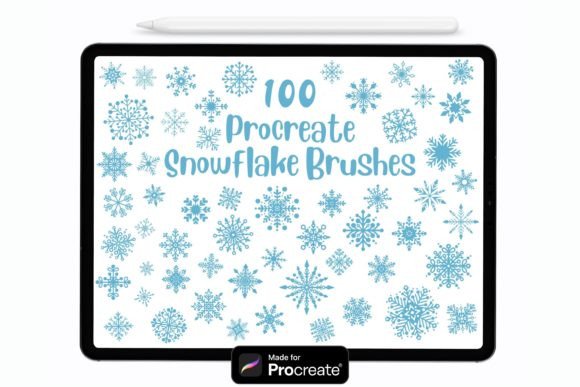
In the realm of digital illustration, efficiency does not have to come at the cost of creativity. The Set of 100 hand drawn snowflake brushes offers a comprehensive solution for artists who wish to incorporate detailed, organic snow patterns into their designs without spending hours drawing each crystal individually. By leveraging these tools, creators can focus more on composition, lighting, and storytelling, letting the brushes handle the repetitive yet intricate details of snowfall and frost.
Understanding the Versatility of Digital Snow Stamps
At first glance, a brush set might seem like a simple collection of stamps. However, modern digital brushes, particularly those designed for robust platforms like Procreate, offer a depth of functionality that goes far beyond static images. These Procreate compatible brushes are engineered to be dynamic. They are pressure sensitive, meaning the output changes based on how hard you press with your stylus. This feature allows for a natural variation in size and opacity, mimicking the way snow accumulates in real life—some flakes are bold and prominent, while others are faint and distant.
The collection includes a diverse array of designs, from simple six-pointed stars to complex, lace-like crystalline structures. This variety ensures that your illustrations do not look repetitive. When creating a winter scene, uniformity can break the illusion of reality. By rotating, resizing, and adjusting the opacity of each stamp, you can create a sense of depth and movement. This level of control is essential for professionals who need their work to stand out in a crowded digital marketplace.
Key Features and Technical Specifications
Before integrating any new tool into your workflow, it is important to understand its technical requirements and capabilities. Here are the core characteristics of this specific brush set:
- Compatibility: These brushes are fully compatible with Procreate version 4.1 and above. This ensures that whether you are using an older iPad model or the latest Pro, the tools will function smoothly.
- Input Flexibility: While optimized for the Apple Pencil, these stamps are versatile enough to be used with third-party styluses or even your finger. This makes them accessible to hobbyists who may not have invested in premium hardware yet.
- Customizability: Users can easily change the color, size, and opacity. This means you are not stuck with white snow; you can create blue-tinted ice, golden holiday sparkles, or dark, stormy sleet depending on the mood of your piece.
- Quantity: With 100 unique hand-drawn designs, the set provides ample variety to keep your compositions fresh and engaging.
Practical Applications for Creators and Businesses
Who benefits most from owning a dedicated set of Snowflake Procreate Brushes? The answer spans a wide range of creative professions and hobbies. Understanding where these tools fit can help you decide if they are the right addition to your library.
Graphic Designers and Print-on-Demand Sellers
For those running online stores selling prints, stickers, or wallpapers, time is money. Creating winter-themed products often requires rapid turnaround times during the holiday season. Using pre-made, high-quality snowflake stamps allows designers to create complex backgrounds and borders quickly. You can layer different brushes to create textured backdrops for quotes, festive greetings, or product mockups. The ability to scale these vectors without losing quality ensures that your designs look sharp on everything from small stickers to large wall art.
Illustrators and Concept Artists
Professional illustrators often need to establish atmosphere quickly. In concept art for games or films, a winter setting needs to feel cold and immersive. These brushes allow artists to paint in snow effects rapidly, focusing on the interaction between the snow and the environment. For example, you can use a larger, softer brush to lay down a base layer of falling snow, then use smaller, sharper stamps to highlight accumulation on branches, rooftops, or character clothing. This layered approach adds realism and depth to the narrative.
Social Media Content Creators
In the fast-paced world of social media, seasonal relevance drives engagement. Content creators can use these brushes to add a festive touch to their posts, stories, and reels. Whether it is adding a subtle snowfall effect to a photo overlay or creating animated sequences where snowflakes drift across the screen, these tools provide the necessary elements to keep content timely and visually appealing.
How to Import and Get Started
One of the most common hurdles for new digital artists is installing custom brushes. Fortunately, the process for this set is straightforward and user-friendly. Follow these steps to integrate the Procreate brushes into your app:
- Download the Files: After purchasing or downloading the set, ensure the files are saved to your iPad’s Files app. They are typically in a .brushset or .procreate format.
- Locate the File: Open the Files app and navigate to the folder where you saved the download.
- Import Automatically: Simply double-tap or right-click on the file. Procreate should launch automatically, and the brushes will be imported into your library. If prompted, confirm the import action.
- Verify Installation: Open Procreate and create a new canvas. Tap on the brush icon to open the brush library. You should see a new folder labeled with the name of the snowflake set. Tap on it to reveal your 100 new brushes.
If the automatic import does not work, you can also tap the "+" sign in the top right corner of the brush library panel in Procreate and select "Import" to manually locate the file. This redundancy ensures that even if one method fails, you can still access your tools.
Best Practices for Realistic Snow Effects
Having the tools is only half the battle; knowing how to use them effectively is what separates amateur work from professional-grade art. Here are some tips for maximizing the potential of your Set of 100 hand drawn snowflake brushes:
Layering is Key: Do not rely on a single layer for all your snow effects. Create separate layers for background snow, mid-ground flakes, and foreground details. This allows you to adjust the opacity and blur of each layer independently, creating a convincing sense of depth. Background snow should be smaller and more transparent, while foreground flakes can be larger and sharper.
Color Variation: Snow is rarely pure white. It reflects the colors of its environment. Try sampling colors from the sky, nearby objects, or light sources and apply them to your snowflake brushes. A slight blue tint can suggest shadow and cold, while a warm yellow or orange hue can indicate sunlight or artificial lighting.
Motion and Direction: Snow rarely falls straight down. Use the transform tool to rotate your brushes slightly, suggesting wind direction. Consistency in the angle of your snowflakes can subtly convey weather conditions, such as a gentle drift versus a blizzard.
Evaluating Suitability for Your Projects
While these brushes are powerful, they are not a one-size-fits-all solution for every artistic need. They are ideal for stylized, semi-realistic, and decorative works. However, for hyper-realistic scientific illustrations, you may need to combine these stamps with manual painting techniques to achieve specific anatomical accuracy of ice crystals. Additionally, because these are raster-based brushes, extremely large enlargements may eventually show pixelation, though this is rare given the high resolution of modern iPad screens.
Consider your project scope. If you are creating a simple icon, a few well-placed stamps may suffice. For a complex landscape, you will need to invest time in layering and blending. The value of this set lies in its ability to reduce the tedious parts of drawing snow, freeing you to focus on the artistic decisions that truly matter.
Conclusion
Incorporating Snowflake Procreate Brushes into your digital workflow can transform how you approach winter-themed projects. By offering a blend of convenience, customization, and artistic quality, this set empowers creators to produce stunning visuals with greater efficiency. Whether you are a seasoned professional or a curious beginner, these tools provide a reliable foundation for exploring the beauty of winter in your digital art. Remember, the best tool is one that enhances your creativity rather than restricting it, and with proper technique, these snowflake stamps can help you bring your coldest, most magical ideas to life.