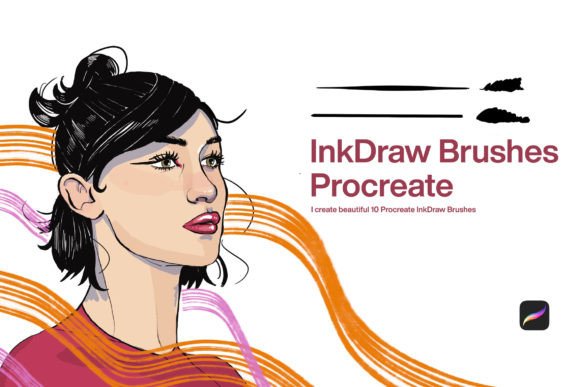
Refining Digital Line Work with 10 Ink Draw Brushes for Procreate
Digital illustration has evolved significantly over the last decade, moving from simple pixel manipulation to sophisticated simulations of traditional media. For artists who value the tactile feedback and organic imperfections of pen on paper, finding the right digital tools is essential. The 10 Ink Draw Brushes Procreate collection addresses this specific need by offering a curated set of tools designed to replicate the behavior, texture, and flow of real-world ink. This article evaluates the practical utility, technical performance, and workflow integration of these brushes for professional creators and serious hobbyists.
The Role of Specialized Ink Tools in Digital Art
Ink is unforgiving. Unlike pencil or charcoal, it does not easily erase or blend, requiring a high degree of confidence and precision from the artist. In a digital environment, this characteristic is often lost due to the ease of undoing mistakes or adjusting opacity. However, many illustrators prefer the commitment and clarity that ink provides. The primary purpose of the 10 Ink Draw Brushes Procreate set is to restore that sense of permanence and physical resistance within the iPad interface.
These brushes are not merely static stamps; they are dynamic tools engineered to respond to pressure, tilt, and speed. When evaluating digital assets, it is crucial to distinguish between decorative brushes and functional tools. This collection falls into the latter category. It is designed for line art, hatching, cross-hatching, and detailed illustration work where consistency and control are paramount. For professionals working in comics, editorial illustration, or architectural sketching, the reliability of the brush engine is just as important as the aesthetic output.
Technical Characteristics and Performance
The effectiveness of any Procreate brush relies on its underlying settings, including streamline, pressure sensitivity, and grain texture. The 10 Ink Brushes for Procreate included in this pack demonstrate a strong understanding of these mechanics. Here is an analysis of their key technical attributes:
- Pressure Sensitivity: The brushes exhibit a natural taper at the beginning and end of strokes. This mimics the way a nib lifts off paper, allowing for variable line weight without manual adjustment. This feature is critical for creating dynamic compositions where line thickness dictates visual hierarchy.
- Texture and Grain: Real ink interacts with paper tooth, creating slight irregularities along the edge of the stroke. These brushes incorporate subtle noise profiles that prevent lines from appearing too sterile or vector-like. The texture is noticeable enough to add character but subtle enough to remain clean at various zoom levels.
- Streamline and Stabilization: Digital drawing can sometimes feel slippery compared to friction-heavy paper. The brush settings include optimized stabilization to smooth out hand tremors while retaining the artist’s intentional gestures. This balance helps maintain the organic feel of hand-drawn ink without sacrificing precision.
- Opacity and Flow: True ink is typically opaque. These brushes maintain consistent density, ensuring that overlapping strokes build up visually rather than becoming muddy or transparent. This behavior is essential for layering techniques such as stippling or dense cross-hatching.
Practical Applications in Professional Workflows
Understanding how a tool performs in isolation is different from assessing its value in a live project. The 10 Ink Draw Brushes Procreate suite offers versatility across several disciplines. For comic artists and graphic novelists, the ability to switch between fine liners for details and broader nibs for outlines without leaving the canvas streamlines the inking process. The consistency across the ten brushes means that artists do not need to constantly adjust settings mid-project.
For architects and industrial designers, quick conceptual sketching often requires tools that feel immediate and decisive. The responsiveness of these ink brushes allows for rapid ideation. The lack of lag or unexpected behavior during fast strokes ensures that the digital medium does not become a bottleneck to creative thought. Furthermore, educators and tutorial creators will find these brushes useful for demonstrating techniques clearly, as the lines remain distinct and legible even when projected or recorded.
Marketers and content creators who produce custom graphics for social media or blogs can also benefit. Hand-drawn elements often stand out in a sea of stock photography and generic vector art. Using these ink brushes allows for the creation of unique icons, dividers, and accents that add a personal, artisanal touch to brand materials.
Evaluating Usability and Learning Curve
One of the strengths of this collection is its accessibility. While the brushes are sophisticated in their programming, they do not require extensive configuration to use effectively. Upon installation, they appear in the Procreate brush library ready for immediate application. This plug-and-play approach respects the user’s time, allowing creators to focus on drawing rather than troubleshooting settings.
However, users transitioning from traditional media should note that digital ink still behaves differently. There is no physical bleed or capillary action. Artists may need to adjust their technique slightly, relying more on pressure control than angle manipulation. The 10 Ink Draw Brushes Procreate set mitigates this by offering a range of nib shapes, from round points to chisel edges, providing options that cater to different holding styles and drawing habits.
It is also worth considering the organizational aspect. The brushes are clearly labeled and grouped, which aids in quick selection during intense workflow sessions. For freelancers managing tight deadlines, this intuitive presentation reduces cognitive load and keeps the creative momentum intact.
Limitations and Considerations
No digital tool is without limitations. While these brushes excel at simulating traditional ink, they are still bound by the capabilities of the iPad hardware and the Procreate software. Users with older iPad models may experience slight latency if the canvas size is extremely large or if multiple complex layers are active. Additionally, those seeking highly experimental or abstract ink effects, such as heavy splatters or wet-on-wet blending, may find this collection too focused on controlled line work.
Furthermore, the aesthetic of these brushes is rooted in realism. If a project calls for a stylized, cartoonish, or purely vector-based look, these organic textures might require additional post-processing or masking to achieve the desired flatness. It is important for buyers to align their expectations with the specific style these brushes are designed to support.
Long-Term Value and Integration
When investing in digital assets, longevity is a key factor. Unlike physical supplies that run out, digital brushes offer indefinite use. The 10 Ink Draw Brushes Procreate collection represents a one-time investment that can serve an artist throughout their career. As Procreate updates its software, these brushes generally remain compatible, ensuring that the toolset does not become obsolete.
The true value lies in how well these tools integrate into an existing workflow. For artists who already rely on Procreate for sketching or coloring, adding a reliable inking suite completes the pipeline. It eliminates the need to export files to other software for line refinement, keeping the entire creative process within a single ecosystem. This efficiency translates to time saved, which is particularly valuable for professionals billing by the hour or managing multiple clients.
Final Recommendations
The 10 Ink Draw Brushes Procreate set is a robust resource for anyone serious about digital line art. It bridges the gap between the convenience of digital editing and the aesthetic integrity of traditional ink. Whether you are a seasoned illustrator looking to refine your digital toolkit or a hobbyist aiming to elevate the quality of your sketches, these brushes offer the control and character necessary for high-quality output.
Before purchasing, consider your primary use case. If your work involves detailed line art, hatching, or expressive drawing, this collection is highly relevant. If your style leans towards painterly textures or flat vector graphics, you may want to explore other options. Ultimately, the best way to evaluate these tools is to test them within your own projects, observing how they respond to your unique hand movements and artistic intentions. By integrating these brushes thoughtfully, you can enhance both the efficiency and the expressive potential of your digital artwork.