Cat Stamp Brushes and Dog Stamp Brushes for Procreate: A Practical Evaluation
Digital illustration has evolved significantly with the introduction of specialized tools that streamline the creative process. Among these tools, stamp brushes have gained popularity for their ability to add consistent, high-quality elements to artwork without the need for manual redrawing. Specifically, Cat Stamp Brushes and Dog Stamp Brushes offer a curated collection of animal illustrations designed for use within the Procreate application on iPad. This evaluation explores the functionality, benefits, and technical considerations of using these specific brush sets to help artists determine if they align with their workflow and artistic goals.
Understanding the Toolset
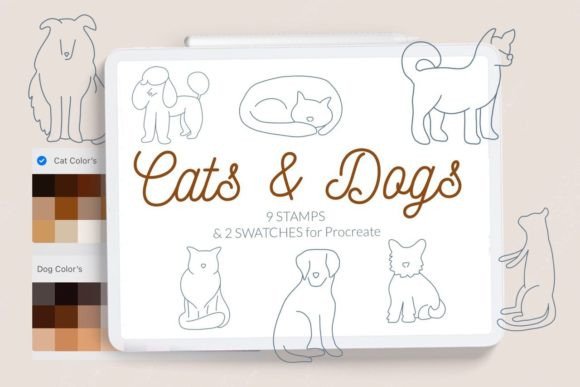
The core product consists of a digital brush set containing nine distinct stamps featuring dogs and cats. These are not traditional painting brushes that simulate texture or flow; rather, they are stamping tools that place a pre-drawn image onto the canvas with each tap or stroke. The set includes two color swatches specifically calibrated to match common dog and cat fur tones, allowing for immediate integration into existing projects. It is important to note that this toolset is exclusively compatible with Procreate on the iPad. The files are distributed as a .brushset file, which bundles all nine stamps into a single importable unit, alongside two separate swatch files.
For artists who frequently incorporate pets into their illustrations, whether for personal projects, greeting cards, or social media content, having ready-made, high-quality assets can significantly reduce production time. The inclusion of both feline and canine subjects provides versatility, catering to a broad range of thematic needs. However, understanding the limitations and specific use cases is essential before integrating these tools into a professional or hobbyist workflow.
Benefits and Artistic Applications
The primary advantage of using Cat Stamp Brushes and Dog Stamp Brushes is efficiency. Drawing animals, particularly realistic or semi-realistic pets, requires a strong understanding of anatomy, fur texture, and proportion. For illustrators who may not specialize in animal portraiture, these stamps provide a reliable baseline. They ensure consistency in style, which is crucial when creating series of images or maintaining a cohesive brand aesthetic.
These brushes are particularly well-suited for:
- Pattern Design: Creating repeating patterns for textiles, wrapping paper, or digital backgrounds where uniformity is key.
- Scrapbooking and Journaling: Adding decorative elements to digital planners or scrapbook pages without spending hours on detailed illustrations.
- Rapid Prototyping: Quickly mocking up compositions to test layout ideas before committing to final, hand-drawn details.
- Educational Materials: Creating engaging visuals for children’s books or educational apps where clear, recognizable animal figures are needed.
The inclusion of dedicated color swatches further enhances usability. By providing predefined colors that complement the stamp designs, the creator reduces the trial-and-error phase of color selection. This allows artists to maintain harmony within their palette, ensuring that the stamped elements do not appear disjointed from the rest of the artwork.
Technical Considerations and Compatibility
Before purchasing or downloading, users must verify their software version. The brush set is designed for modern iterations of Procreate but carries a specific constraint: it is not available for Procreate version 4.0 or earlier. This is a critical technical detail. Users with older iPads that cannot support newer versions of Procreate, or those who have deliberately remained on older software for compatibility with other legacy tools, will not be able to utilize the .brushset format effectively.
For those with compatible systems (Procreate 5.0 and later), installation is straightforward. However, for users on older systems or those preferring manual management, the provider offers an alternative method using individual .brush files. Understanding the installation process is vital to ensuring the tools function correctly.
Installation Methods
There are two primary ways to install these brushes, depending on your device and software version. The recommended method for most users is the direct import of the brush set.
- Direct Import (Recommended for Modern Versions):
- Download the
.brushsetfile to your iPad. - Tap the file in your Files app.
- Select "Open in Procreate."
- The entire set, including all nine stamps, will automatically appear in your brush library.
- Download the
- Manual Installation (For Older Versions or Individual Brushes):
- Download the folder containing individual
.brushfiles to your iPad. - Open the folder and locate the specific
.brushfile you wish to install. - Tap and hold the file with your finger or Apple Pencil.
- Select "Share" from the context menu.
- If "Open in Procreate" is not immediately visible, scroll through the options and select "More," then find and click "Open in Procreate."
- Alternatively, open Procreate, create a new brush collection, and select "Import" to navigate to the downloaded folder and add the brush manually.
- Download the folder containing individual
This dual approach ensures accessibility for a wider range of users, although the manual method is more time-consuming if installing all nine stamps individually.
Tradeoffs and Limitations
While stamp brushes offer convenience, they come with inherent tradeoffs. The most significant limitation is the lack of customization regarding the core shape of the stamp. Unlike a standard brush where you can adjust size, opacity, and flow dynamically to create varied strokes, a stamp places a static image. While you can resize and rotate the stamp after placement, you cannot alter the internal details of the drawing without additional editing layers.
Furthermore, overreliance on stamp brushes can lead to a repetitive aesthetic if not used thoughtfully. Artists should consider these tools as components within a larger composition rather than the sole focus. For projects requiring unique, one-of-a-kind character designs, hand-drawing remains the superior choice. Stamp brushes are best viewed as supplementary assets that enhance productivity rather than replace fundamental illustration skills.
Decision-Making Insights
When evaluating whether Cat Stamp Brushes and Dog Stamp Brushes are right for your needs, consider your current project volume and style. If you frequently create content involving pets and value speed and consistency, this set offers a strong return on investment. The inclusion of both cats and dogs provides sufficient variety for general use, though niche projects requiring specific breeds or poses may still require custom illustration.
Additionally, assess your technical environment. If you are using an older iPad restricted to Procreate 4.0 or earlier, verify that you are comfortable with the manual installation process using individual .brush files. If you prefer seamless integration and automatic updates, ensuring your software is up to date is a prerequisite.
Ultimately, these brushes serve as a practical solution for digital artists seeking to streamline their workflow. By balancing the convenience of pre-made assets with the flexibility of digital editing, users can enhance their creative output while maintaining artistic integrity. As with any digital tool, the value lies in how effectively it integrates into your existing process, supporting your goals without constraining your creative expression.
© Let s Art ♡