Frame Stamp Brushes for Procreate: A Practical Evaluation
Digital illustration has evolved significantly with the introduction of specialized tools that streamline the creative process. Among these tools, stamp brushes have gained popularity for their ability to add intricate details without requiring manual drawing from scratch. The Frame Stamp Brushes by Funnyarti represent a specific category of digital assets designed to enhance workflow efficiency within the Procreate ecosystem. This article evaluates the utility, compatibility, and practical applications of this brush set to help digital artists determine if it aligns with their project requirements.
Understanding Frame Stamp Brushes
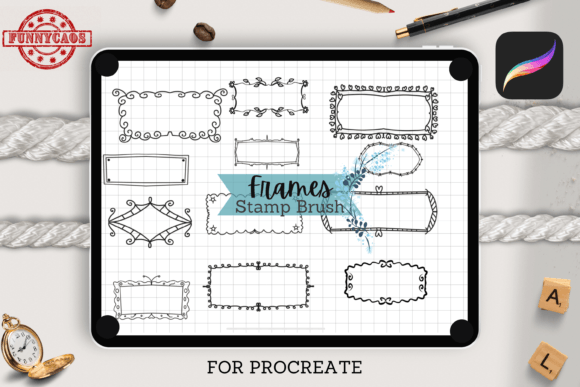
Frame Stamp Brushes are pre-designed digital stamps that function as single-stroke elements within the Procreate application. Unlike traditional brushes that rely on pressure sensitivity and stroke direction to create texture or line weight, stamp brushes deposit a complete image or shape onto the canvas with a single tap. The collection provided by Funnyarti includes twelve distinct frame designs, packaged within a single brush set file. These frames are vector-based or high-resolution raster images optimized for scalability, allowing users to adjust their size and color without significant loss of quality.
The primary function of these brushes is to serve as decorative borders or structural elements in digital compositions. They are particularly useful for artists who need to create consistent, professional-looking boundaries for their artwork. By integrating these stamps into a workflow, creators can bypass the time-consuming process of drawing complex geometric or ornamental frames manually. This allows for a greater focus on the central subject matter of the illustration rather than peripheral decorative elements.
Key Features and Technical Specifications
When evaluating digital assets, understanding technical specifications is crucial for ensuring compatibility and ease of use. The Frame Stamp Brushes set comes delivered in a compressed Zip folder, which contains the necessary brush set file for immediate import into Procreate. The set includes twelve unique stamps, offering a variety of styles that can suit different aesthetic preferences, from minimalist lines to more elaborate decorative patterns.
One of the most significant features of this toolset is its flexibility regarding customization. Users can modify both the color and size of each stamp independently. This adaptability is essential for maintaining visual coherence across a project. For instance, an artist working on a pastel-themed worksheet can easily adjust the frame color to match soft hues, while a designer creating bold marketing materials might opt for high-contrast black or vibrant primary colors. The ability to resize without pixelation ensures that the frames remain crisp whether used for small digital stickers or larger print-ready cards.
Practical Applications and Use Cases
The versatility of Frame Stamp Brushes makes them suitable for a wide range of digital projects. Understanding where these tools fit best can help users maximize their value. Below are several common scenarios where these stamps prove particularly effective:
- Digital Stickers: Creators who design sticker packs for platforms like GoodNotes or Notability can use these frames to create cohesive sets. The stamps provide a uniform look that enhances the professional appearance of the final product.
- Educational Worksheets: Teachers and educational content designers often require engaging layouts for worksheets. Frame stamps can border questions, highlight key information, or separate sections, making the material more visually appealing and easier to navigate for students.
- Greeting Cards and Invitations: For freelance designers creating digital or print-on-demand cards, these brushes offer a quick way to add elegant borders. This reduces the turnaround time for custom orders while maintaining a high standard of design.
- Logo Design Elements: While not a complete logo solution, these frames can serve as foundational elements for badge-style logos or emblems. They provide a structured boundary that can contain text or icons effectively.
By incorporating these stamps, artists can build their ideas more rapidly. The ease of adding pre-made elements allows for quicker iteration during the brainstorming phase, enabling designers to test multiple layout options without investing excessive time in drawing repetitive structures.
Compatibility and System Requirements
A critical consideration for any potential buyer is software and hardware compatibility. The Frame Stamp Brushes by Funnyarti are exclusively designed for Procreate, a popular raster graphics editor developed for iOS. This specificity means that the brushes are not compatible with other digital art applications such as Adobe Photoshop, Clip Studio Paint, or Procreate Pocket on iPhone. Users must ensure they are working within the Procreate environment on an iPad to utilize these assets.
Furthermore, the optimal experience requires specific hardware. The brushes are intended for use with an iPad or iPad Pro in conjunction with an Apple Pencil. While Procreate supports touch input, the precision and functionality of stamp placement are significantly enhanced when using the Apple Pencil. It is important to note that these brushes are not suitable for other programs and applications. Attempting to import the .brushset file into unsupported software will result in errors or inability to load the assets. Therefore, users invested in alternative ecosystems should consider this limitation before purchasing.
Benefits and Tradeoffs
Like any digital tool, Frame Stamp Brushes offer distinct advantages while presenting certain limitations. Evaluating these factors helps in making an informed decision.
Benefits
The primary benefit is efficiency. Drawing intricate frames manually requires a steady hand and considerable time. Stamp brushes eliminate this barrier, allowing for instant placement. Additionally, the consistency offered by stamps ensures that all frames in a project share the same line weight and style, which is difficult to achieve when drawing freehand. The customizability of color and size further enhances their utility, making them adaptable to various brand guidelines or artistic themes.
Tradeoffs and Considerations
The main tradeoff is limited exclusivity. Since these are pre-made assets, other users may have access to the same designs. For artists seeking completely unique, one-of-a-kind elements, custom-drawn frames may still be necessary. Additionally, the platform restriction limits the audience to Procreate users only. Artists who switch between multiple software platforms may find it inconvenient to maintain separate asset libraries for each program. Finally, while the set includes twelve stamps, users requiring a vast variety of frame styles may need to supplement this set with additional resources.
Decision-Making Insights: Is This Set Right for You?
Determining whether Frame Stamp Brushes align with your goals depends on your current workflow and project types. If you frequently create content that requires bordered elements—such as planners, worksheets, or social media graphics—this tool can significantly reduce production time. It is particularly valuable for educators, small business owners, and digital planners who need to produce high volumes of consistent content.
However, if your work primarily involves freeform illustration, concept art, or painting where borders are rarely used, the utility of this set may be limited. Similarly, if you do not use an iPad with Procreate, these brushes will not be accessible to you. In such cases, exploring vector-based frame libraries compatible with desktop software like Adobe Illustrator might be a more suitable alternative.
For those already embedded in the Procreate ecosystem, the low learning curve and immediate applicability of these stamps make them a practical addition. They serve as a functional tool rather than a creative crutch, allowing artists to focus their energy on composition and storytelling rather than repetitive decorative drawing. By assessing your specific needs for speed, consistency, and platform compatibility, you can determine if Frame Stamp Brushes by Funnyarti are the right fit for your digital toolkit.