Evaluating Procreate Soft Brushes for Digital Illustration
Digital illustration on the iPad has evolved significantly, with Procreate standing out as a premier application for artists of all skill levels. A critical component of the digital workflow is the selection of brush tools, which dictate texture, flow, and overall aesthetic. Among the vast array of available tools, Procreate Soft Brushes have gained attention for their ability to mimic traditional media while offering the flexibility of digital editing. This article evaluates a specific set of five soft brushes, exploring their utility, compatibility, and suitability for various artistic goals.
Understanding the Toolset
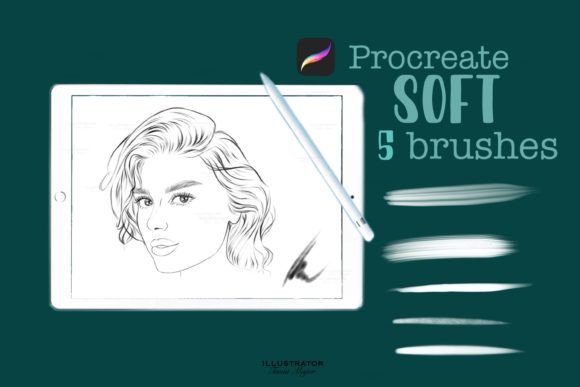
The term Procreate Soft Brushes generally refers to digital brush presets designed to produce smooth, blended strokes with low hardness edges. Unlike hard-edged brushes that create sharp, defined lines, soft brushes are engineered for gradual transitions in opacity and color. The specific set under review contains five distinct stamps or brushes, each tailored for different aspects of the illustration process. These include a Contour brush, an Accent brush, a general soft brush, and a specialized Hair brush.
These tools are not standalone applications but rather asset files compatible exclusively with the Procreate iPad app. To function correctly, users must ensure they are running Procreate Version 5 or higher. The installation process involves downloading the brush file directly onto the iPad and importing the set into the Procreate library. This straightforward integration allows artists to expand their toolkit without complex software configurations.
Core Components and Functionality
To determine if this brush set aligns with your needs, it is essential to understand the specific role of each included tool. The set is designed to cover a range of textural requirements, from broad shading to fine detailing.
- Contour Brush: This tool is typically used for defining shapes and establishing the underlying structure of a subject. It offers a balance between softness and control, allowing artists to map out forms without the harshness of a pen tool.
- Accent Brush: Designed for highlighting and emphasizing specific areas, the accent brush helps draw the viewer’s eye to focal points. It is particularly useful for adding depth and dimension through strategic light placement.
- Soft Brush: As the foundational tool in the set, this brush is ideal for blending colors, creating gradients, and laying down base tones. Its primary advantage is the seamless transition it creates between different hues.
- Hair Brush: Rendering hair digitally can be challenging due to the need for both flow and individual strand definition. This specialized brush aims to simplify that process by providing a texture that mimics natural hair clusters.
- Fifth Stamp: The set includes a fifth element, completing the collection. While specific characteristics may vary, it is intended to complement the other four tools, offering additional versatility for design creation.
Benefits of Using Soft Brushes
Artists often turn to Procreate Soft Brushes when seeking a more organic, painterly look. One of the primary benefits is the ability to achieve realistic lighting and shading. Hard brushes can sometimes result in a "cut-out" appearance, whereas soft brushes allow for subtle gradations that mimic how light interacts with three-dimensional forms.
Furthermore, these brushes are highly effective for portrait work and character design. The inclusion of a dedicated hair brush addresses a common pain point for digital artists, reducing the time required to render complex textures. Similarly, the contour and accent brushes streamline the workflow by providing pre-configured settings that eliminate the need for constant manual adjustment of opacity and flow.
For beginners, using a curated set like this can accelerate the learning curve. Instead of spending hours tweaking brush engine settings, users can focus on fundamental skills such as composition, color theory, and anatomy. The predefined nature of these tools ensures consistent results, which can be encouraging for those still developing their digital technique.
Tradeoffs and Considerations
While soft brushes offer significant advantages, they are not a universal solution. One notable tradeoff is the lack of precision. For technical illustrations, architectural drawings, or comic book inking that requires crisp, clean lines, soft brushes may feel inadequate. In such cases, artists might need to supplement this set with harder, more defined brushes.
Another consideration is the potential for over-blending. Because soft brushes merge colors so easily, there is a risk of losing texture and detail if used excessively. Artists must exercise discipline to maintain contrast and visual interest. Additionally, the performance of these brushes can depend on the iPad’s hardware. Older models may experience latency when using complex brush stamps, although the Procreate app is generally well-optimized.
It is also important to note the compatibility restriction. These brushes are designed solely for the Procreate ecosystem. Users who work across multiple platforms, such as Adobe Fresco or Photoshop on desktop, will not be able to use this specific file format. This limits the portability of the workflow for professionals who rely on cross-platform consistency.
Ideal Use Cases
This brush set is a strong fit for several specific artistic scenarios:
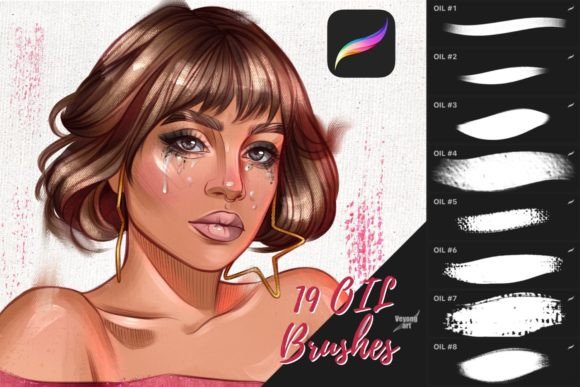
- Portrait Illustration: The combination of contour, accent, and hair brushes makes this set particularly suitable for rendering faces and figures. The soft transitions help achieve realistic skin tones and facial features.
- Concept Art: When brainstorming ideas quickly, artists benefit from tools that allow for rapid blocking and shading. The soft brushes facilitate quick iteration without getting bogged down in minute details.
- Digital Painting: For those aiming to replicate traditional media such as pastels, charcoal, or airbrushing, these brushes provide the necessary texture and blendability.
- Beginner Learning: New users can explore the capabilities of Procreate without being overwhelmed by the extensive brush customization options.
When to Consider Alternatives
Despite their versatility, there are situations where alternative tools may be more appropriate. If your primary focus is line art, typography, or graphic design, you may find greater value in brush sets that emphasize sharp edges and uniform stroke width. Similarly, if you require highly textured effects such as impasto oil paint or rough watercolor paper grain, you might need to look for specialized texture brushes rather than general soft brushes.
Additionally, artists who prefer a fully customizable workflow might find predefined sets limiting. Procreate allows for extensive brush modification, and experienced users may prefer to build their own libraries from scratch to suit their unique style. In these cases, investing time in learning the brush studio features may yield better long-term results than relying on a preset pack.
Making an Informed Decision
Choosing the right digital tools is a personal process that depends on your artistic goals and current skill level. Procreate Soft Brushes offer a practical solution for artists seeking to enhance their shading, blending, and texturing capabilities. The inclusion of specialized tools like the hair and accent brushes adds value by addressing specific challenges in digital illustration.
Before purchasing or downloading, consider your typical project types. If you frequently work on portraits, soft landscapes, or painterly concepts, this set is likely to integrate seamlessly into your workflow. However, if your work demands high precision or cross-platform compatibility, you may need to supplement these brushes with other tools or explore different options.
Ultimately, the effectiveness of any brush set lies in how well it supports your creative vision. By understanding the strengths and limitations of Procreate Soft Brushes, you can make a confident decision that aligns with your artistic journey. Whether you are refining your technique or expanding your digital toolkit, evaluating these tools against your specific needs ensures a productive and satisfying creative experience.