Integrating 17 Colorful Brushes for Adobe Illustrator into Professional Design Workflows
In the landscape of digital illustration and graphic design, efficiency is often determined by the quality of your assets. While vector precision is a hallmark of Adobe Illustrator, achieving an organic, hand-crafted aesthetic can sometimes feel labor-intensive. This is where specialized asset libraries become critical components of a modern designer’s toolkit. The 17 Colorful Brushes - Adobe Illustrator package represents more than just a collection of shapes; it is a workflow accelerator designed to bridge the gap between rigid vector geometry and the fluid spontaneity of traditional media.
For professionals ranging from freelance illustrators to marketing agencies, understanding how to integrate these tools effectively can significantly reduce production time while enhancing visual appeal. This article explores the practical application of this brush library, focusing on installation, implementation, and strategic use within broader creative projects.
Understanding the Asset: Texture and Motif
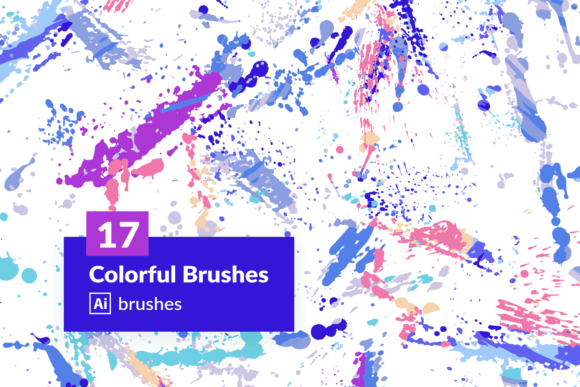
The core value of this package lies in its specific aesthetic direction. Unlike generic stroke libraries, these brushes are built around a texture motif of spilled paints. This design choice is intentional. Spilled paint suggests movement, accident, and raw creativity—elements that are difficult to replicate manually using standard pen tools without extensive trial and error.
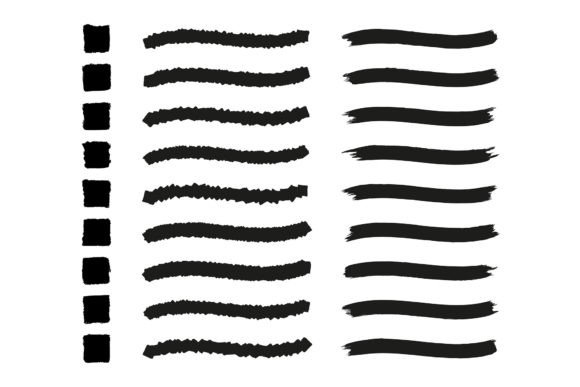
The library includes 17 distinct brushstrokes, each offering a unique variation in density, spread, and color interaction. Because they are vector-based, they retain scalability without losing resolution, a crucial factor for outputs ranging from small social media graphics to large-format print materials. Additionally, the inclusion of a seamless pattern design (64 x 64 cm at 300 dpi) extends the utility of the package beyond simple line work, allowing for background textures and surface designs that maintain consistency across tiled areas.
Preparation and Installation Process
Before integrating any new asset into a professional workflow, proper setup is essential to ensure compatibility and ease of access. The package includes an AI file containing the brushstrokes library and a detailed instruction guide with screenshots. Following these instructions precisely prevents common errors such as missing links or corrupted brush definitions.
To install the library, users typically load the provided AI file into Adobe Illustrator. The process involves opening the Brushes panel, selecting the "Open Brush Library" option, and navigating to the downloaded file. Once loaded, these brushes appear in a separate panel, keeping the default workspace uncluttered. It is advisable to save this library as a permanent collection within Illustrator’s user presets. This step ensures that the brushes are available in every new document, eliminating the need to re-import them for each project. This small upfront investment in organization pays dividends in long-term efficiency.
Strategic Integration into Design Workflows
The utility of the 17 Colorful Brushes - Adobe Illustrator set varies depending on the stage of the design process. Understanding when to deploy these assets can streamline production and enhance creative outcomes.
Conceptualization and Brainstorming
During the early phases of a project, speed is paramount. Designers often need to visualize ideas quickly without getting bogged down in technical details. These hand-painted brushstrokes allow for rapid prototyping of mood boards and concept sketches. By applying spilled paint textures, creators can establish a tonal direction—whether vibrant and chaotic or subdued and artistic—before committing to final vector paths. This helps in communicating visual concepts to clients or team members early in the decision-making process.
Execution and Layering
In the production phase, these brushes serve as excellent layering elements. Vector art can sometimes appear flat or sterile. Introducing organic textures adds depth and visual interest. For example, a clean logo mark can be juxtaposed with a subtle spilled paint stroke in the background to create a dynamic contrast between precision and chaos. This technique is particularly effective in branding projects for industries such as craft beverages, artisanal products, or creative agencies that wish to convey a human touch.
Because the brushes are vector objects, they remain fully editable. Designers can adjust anchor points, modify colors, and change opacity settings to match specific brand guidelines. This flexibility ensures that the assets do not dictate the design but rather support it. The ability to recolor the brushes also means they can be adapted to any color palette, making them versatile for diverse client requirements.
Post-Production and Polish
In the final stages, the seamless pattern included in the package becomes invaluable. Backgrounds often require repetitive elements that do not distract from the primary content. The 64 x 64 cm seamless swatch, rendered at 300 dpi, provides high-resolution texture suitable for print. Designers can apply this pattern to packaging designs, website headers, or printed collateral. Since it is seamless, it tiles perfectly without visible breaks, ensuring a professional finish. This eliminates the time-consuming task of creating custom patterns from scratch, allowing designers to focus on layout and typography.
Compatibility and Technical Considerations
While Adobe Illustrator is the primary platform for these assets, their vector nature allows for interoperability with other design software. Users can export individual brushstrokes as SVG or PNG files for use in web design tools like Figma or Sketch. However, maintaining the original AI format is recommended for maximum editability. When collaborating with teams, it is crucial to outline fonts and expand appearances if sending files to users who do not have the brush library installed. This ensures that the visual integrity of the design remains intact regardless of the recipient’s asset library.
Performance is another consideration. Complex vector brushes with numerous anchor points can increase file size and processing load. To maintain efficiency, designers should use these brushes judiciously. For large-scale compositions, consider rasterizing specific texture layers at high resolution once the design is finalized. This reduces the computational burden on the software while preserving visual quality for the final output.
Quality Control and Consistency
Maintaining visual consistency is a challenge when using organic textures. The spilled paint motif inherently contains randomness, which can lead to inconsistencies if not managed carefully. To address this, designers should establish a limited subset of brushes for each project. Rather than using all 17 variations indiscriminately, select two or three that best align with the project’s tone. Create a style guide that defines how these brushes are applied, including standard opacity levels, color codes, and scaling restrictions.
Regularly reviewing the output across different devices and media is also essential. What looks vibrant on a calibrated monitor may appear washed out in print. The 300 dpi resolution of the included pattern ensures print readiness, but screen-based applications may require optimization for web performance. Testing the assets in real-world scenarios helps identify potential issues before final delivery.
Long-Term Value and ROI
Investing in high-quality asset libraries like the 17 Colorful Brushes - Adobe Illustrator package offers significant return on investment over time. The hours saved by not having to create custom textures from scratch can be redirected toward higher-value tasks such as client communication, strategic planning, or complex illustration work. Furthermore, having a reliable set of go-to textures helps develop a recognizable style, which can be a valuable asset for freelancers and agencies building a brand identity.
For educators and students, these tools provide a practical way to study the intersection of digital and traditional art forms. Analyzing how vector paths mimic paint spills can deepen understanding of both medium capabilities and limitations. This educational aspect adds another layer of value beyond immediate commercial application.
Conclusion
The integration of specialized tools into a design workflow is not merely about acquiring new assets; it is about enhancing capability and efficiency. The 17 Colorful Brushes - Adobe Illustrator library offers a practical solution for designers seeking to inject organic energy into their vector work. By understanding the installation process, strategic application, and technical considerations, professionals can leverage these resources to elevate their output. Whether used for rapid conceptualization, detailed execution, or final polishing, these brushes represent a versatile addition to any creative toolkit. As with any tool, mastery comes from consistent practice and thoughtful integration into existing processes. By adopting a structured approach to using these assets, designers can achieve greater consistency, efficiency, and creative freedom in their projects.